10.30.2018

ISTA+ V4.12 Expert Mode Activation, Single Module Programming

Does anyone have a solution for Ista+ Programming Expert Mode?
No expert mode available yet for ISTA+ v4.11.12.

This will be an issue in feature, expert mode can get you out of unpleasant work.
For example if you update i update a whole g11 with ista p and if you update kafas you lose fsc codes, so if i deselected kafas, fsc stayed unharmed. But you can do that now with ista+
One more important remark is that esys wont let you update a module that is allready updated, but ista let you do it, so after 7/11 psdzdate you are stuck with this issue too…

Best to use a router for programming HUH etc through ista
Or you can just use tftpd32 (or tftpd64 if 64bit OS)

Update: ISTA+ 4.12.12 has the expert mode – Confirmed!
ista-p-expert-mode-1

ista-p-expert-mode-2

ista-p-expert-mode-3

ista-p-expert-mode-4

ista-p-expert-mode-5
Note that Ista+ expert mode is Ista P expert mode
ista-p-v-4-12
The difference between Expert mode and Ista plus?

The difference is his loader allows for hiding of modules
Ista plus does not he or someone may be working on an alternate loader to hide retrofitted modules but as it so far look into ESYS for that only option I can think of right now last istap that had a lot a F ,G or I cars was 3.64.2 as 3.65.0 only had like 2 model forget exactly which ones you have to double or make link dos command to point to istaplus PSdZ folder

Some new solutions to activate ISTA-P expert mode ?

so updating the folders in ISTA-P with the files from PSdz swe will not do the trick. You will be inserting back all the missing vehicles. I saw in the main series you will have to rename F, G, I series files to reflect.

after copy PSDz (data_swi) to pszdata ISTA P with correction data in mainseries, add data F001, F10,…etc = same result
ISTA P shows window that car is not programmable (only ISTA+)
trick is somewhere else

this is Ista p expert mode confirmed to work 100%


Why not just use a earlier version of ISTA-P (such as 4.08 or 4.10) to do single module coding?
Because what i am getting is there are problematic files out there that BMW knows about and in the latest version of ISTA+ it can stop from a certain update and keep the module on the one that works. So could you not reverse populate for example take the p-files from a later version to a previous but you would need all files and folders for example. anyone with more can chime in


Anyone has good success with Ista P expert mode?
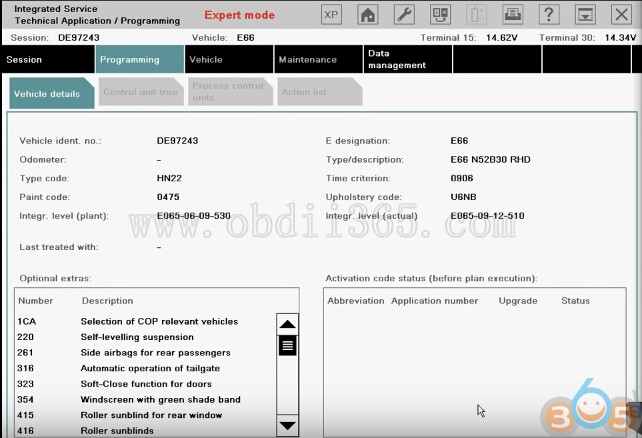
Yep. Have tested Expert Mode on BMW e66
Here is the details…
Select Create new session. Click on Select ISTA/P server automatically. Click on Continue.
ista-p-expert-mode-bmw-e66-1
Click on ICOM Next/ICOM A2 emulator & Connect to continue.
ista-p-expert-mode-bmw-e66-2
Connecting…
Click on on the 4th button at the top, to get the information of Connection manager, then close that interface.
Determining model series…(E66)
Data being checked…
Checking vehicle identification number…(DE97243)
Control unit replaced?
Click on No, and also click on “Before starting vehicle programming…” click on Next.
ista-p-expert-mode-bmw-e66-3
Control unit change over.
ista-p-expert-mode-bmw-e66-4
Determining…
Identifying fitted control units…
Determining target context…
Calculating measure plan…

Go to Control unit tree, and select ZGM.
ista-p-expert-mode-bmw-e66-5
Edit plan show as follows:
ista-p-expert-mode-bmw-e66-6
Go to Immediate measures.
Click on Hide all actions.
ista-p-expert-mode-bmw-e66-7
Go to Edit plan. No cross on Program P. Then close it.
ista-p-expert-mode-bmw-e66-8
Select SZL.
ista-p-expert-mode-bmw-e66-9
Edit plan show as follows:
ista-p-expert-mode-bmw-e66-10
Go to Immediate measures.
Click on Hide all actions.
Back to Edit plan. No cross there. Then close it.
ista-p-expert-mode-bmw-e66-11

Done!


10.15.2018

Free Download BMW ISPI ETK 2018.10 and Price List

Here you can download BMW ETK Dealer Parts Catalog & Diagrams.


BMW ETK is a parts catalogue of all BMW & Mini cars & motorcycles.

- It is very hand because it provides exploded view diagrams of every system and component.
- Parts are searchable through a part number search, description search, or by browsing through the systems and exploded view diagrams.
bmw-etk-software-2018

Free Download BMW ISPI ETK 2018.10

https://mega.nz/#!yjAnzaLJ!gtYEc-_pDU_H4-nSVZoj06qnUjLv7Xk-QD80fLdrXuA


Free Download ETK 10/2018 Price List:

https://mega.nz/#F!Z5FxiaxL!bDhlFiK3LB4wrTo05AIoEQ


here is the pricelist and new car's:

5’ G30 LIM 530i IDN RL

6’ G32 GT 630i IDN RL

8’ G15 Cou 840dX ECE LL
8’ G15 Cou 840dX ECE RL
8’ G15 Cou M850iX ECE LL
8’ G15 Cou M850iX ECE RL
8’ G15 Cou M850iX USA LL

X2’ F39 SAC X2 16d ECE LL
X2’ F39 SAC X2 16d ECE RL
X2’ F39 SAC X2 18dX ECE LL
X2’ F39 SAC X2 18dX ECE RL
X2’ F39 SAC X2 20d ECE LL
X2’ F39 SAC X2 20d ECE RL
X2’ F39 SAC X2 M35iX ECE LL
X2’ F39 SAC X2 M35iX ECE RL
X2’ F39 SAC X2 M35iX USA LL

i3’ I01N MCV i3 120Ah ECE LL
i3’ I01N MCV i3 120Ah ECE RL
i3’ I01N MCV i3 120Ah USA LL
i3’ I01N MCV i3 120Ah Rex ECE LL
i3’ I01N MCV i3 120Ah Rex ECE RL
i3’ I01N MCV i3 120Ah Rex USA LL
i3’ I01N MCV i3s 120Ah ECE LL
i3’ I01N MCV i3s 120Ah ECE RL
i3’ I01N MCV i3s 120Ah USA LL
i3’ I01N MCV i3s 120Ah Rex ECE LL
i3’ I01N MCV i3s 120Ah Rex ECE RL
i3’ I01N MCV i3s 120Ah Rex USA LL


SYSTEM REQUIREMENTS, INSTALLATION, & FORMAT:

Installation is very simple. The BMW Super Bundle comes on an 8.5GB Dual-Layer DVD.
All three programs come pre-installed on a Virtual PC Image: Simply extract and run!


Software Language: English

System Requirements:
2GHz 64 Bit Processor that supports Virtualization
2GB RAM
20GB Hard Drive Space
DVD-ROM Drive


Supported Operating Systems:
Windows XP (64 bit)
Windows Vista (64 bit)
Windows 7 (64 bit)
Windows 8 (64 bit)
Windows 10

10.11.2018

How to enable Basic Features in ISTA software

Enable basic features in the latest ISTA:
Add to ISTAGUI.exe.config file:
<add key=”BMW.Rheingold.VehicleIdentification.BasicFeatureIdentEnabled” value=”true” />

where to put it in the config file:

<!– OperationalMode –>
<add key=”BMW.Rheingold.CoreFramework.PrintingXpsPath” value=”..\..\..\Print” />
<add key=”BMW.Rheingold.VehicleIdentification.BasicFeatureIdentEnabled” value=”true” />

That comes very handy!

Here all models work in Basic features! Good job.
Btw, it does not work with the very latest models like G05, G07, G29.

Why do you need “basic features” & What it is:
If the vehicle identification number is unknown, you can alternatively use the “Basic features” tab.
ista-basic-feature
How to identify a vehicle via ISTA basic features:
◊ Click the “Identification” main menu. The “VIN” tab will be selected.
◊ Click on the “Basic features” tab.
◊ If required, choose another basic feature from the left-hand
“Basic features” selection list.
◊ Define the contents for the basic feature by selecting an entry from the central list.
◊ If necessary, repeat the entry with other basic features (the predefined sequence does not
have to be observed) or click the “Accept” button.
After the individual basic features, the workshop system only offers items that are compatible with
the previously selected ones. This excludes contradictory entries.
There is no need to enter all available basic features. However, you must define at least one. The
more completely you specify the basic features, the more precisely the workshop system can select
the matching documents.

NOTE
Without specification of E-designation and in some cases the model year and month,
vehicle-specific searches for the function structure, component structure, or service
function structure cannot be performed!

NOTE
It is not possible to manually select the features for security vehicles.
Security vehicles can only be identified via the VIN.

After entering the basic features a check is performed to see whether an operation with the
specified features is already present in the operations list and a selection is offered. If the selected
basic feature combination is unknown, a new operation is automatically created

Incomplete entry of basic features:
If you click the “Accept” button without having defined all “Basic features”, a popup window
appears containing a system message. Acknowledge the message with “Continue” to end the
vehicle selection procedure or return to selection of the basic features with “Cancel”.
ista-basic-feature-not-completed
On completion of vehicle identification, the display switches over to the “Operation details” menu

More images of BMW ICOM ista basic features:
ista-basic-feature-image-1

ista-basic-feature-image-2

ista-basic-feature-image-3

ista-basic-feature-image-4

http://blog.obdii365.com/2018/10/11/enable-basic-features-in-bmw-icom-ista-software/

9.27.2018

BMW Coding App Bimmercode vs. Carly vs. BimmerLink

What's the difference between Bimmercode, Bimmerlink and Carly?

Which one is best?

Which one is easier to use?


The three apps I could find and ultimately am reviewing are Bimmercode, Bimmerlink and Carly BMW. Let's break down the price first:


Bimmercode
Vgate iCar 2 Mini WiFi OBD - $22.99
BimmerCode App - $29.99
BimmerLink App - $29.99
Total for setup = $82.97 (plus local taxes)


Vgate icar 2 is the cheapest option, better use Vgate iCar 3.0 BT and Vgate iCar Pro 4.0 Bluetooth which has higher transmission rate.

vgate-icar-2


vgate-icar-2-3.0


vgate-icar-4.0


Carly BMW
Carly BMW Gen 2 WiFi OBD (iPhone) - $88.55 (not the best price)
Carly BMW Pro App - $44.99
iDrive Coding Add On - $14.99
Service Reset Add On - $4.99
Battery Registration Add On - $9.99
Total for setup = $163.51 (plus local taxes)

carly-bmw-app-1


carly-bmw-app-2

carly-bmw-app-3

Note* Now you can use Carly for BMW Pro cracked without special connector. Use default Bluetooth or WiFi OBD II adapter. Get the most out of your BMW by keeping it healthy, personalized and connected.

carly-bmw-app-4

I will compare what the apps do not share in common (features only available in one app). I will give my final thoughts on each app and final verdict.

A key note is that buying BimmerCode and BimmerLink will land you at the same price as Carly BMW Pro + iDrive Coding Add on. $60 and the apps try to be identical. Both will code/diag. The Lite or Free versions of both apps are for testing compatibility only.

*If you are using an Android phone, your only choice is Carly BMW. The reviews today are based off the iPhone apps. Bimmercode is iPhone ONLY*


General: Bimmercode

bimmercode-app


Bimmercode is unique in the sense that it splits its features into two individual apps. Both apps use the same OBD connector so no need to worry about purchasing another device. The interface is clean and easy to use. Cost savings can be had if you ONLY want to code. The BimmerCode app, codes, and thats about it. Unlike Carly BMW it does offer an advanced setting which looks to closely match the ability of dealership scanner. The modules turn to German text and the list grows very very long. Unfortunately, I am no expert, and really can't comment on how well Expert mode works or its ability to compete with a full PC/Software based setup. More on Expert mode later.

General: BimmerLink

bimmerlink-app

The BimmerLink app does the Sensor Values, Dashboard Values, ASD, and Exhaust Flap. Its the services app. BimmerLink has no official website and BimmerCode's website is pretty much just a landing page for the app. The website offers no insight as to the future direction that the apps will be taking. Additionally, it only covers Fxx Series BMWs and above.

General: Carly BMW

carly-bmw-app


Carly BMW packs all of its features into a single app. Ability to do everything via the Carly branded OBD connector. The interface is also clean and easy to use. The punch to the face comes when you purchase the Pro version only to find out that you must dole out more cash for Add-On packs. While you do get lifetime updates to both the connectors firmware and any features/packs you already purchased, it's fair to assume that any NEW Add-Ons will cost you. Carly BMW offers several additional features that Bimmercode does not(Service reset, Battery Programming, Used Car Check, Etc).

Unlike BimmerCode's website, Carly BMW's is full featured. Providing manuals, feature lists, and a spot that shows current projects/status. Carly promises to continue to update the app and the project list supports this claim. It covers both Exx and Fxx Series BMW's and above.


What the Apps do the same:
Diagnostics: Both apps appear to do the same. However BimmerLink fails to sort or translate into English. Carly BMW takes quite awhile longer to scan for errors, but offers the benefits of being able to scan all or select a specific module/s for scanning.


Coding: I can't do a full side by side comparison of every single possible feature. Both company websites have the full coding lists separated out by BMW Model. They match what many of the "Remote Services" offer. They backup the current reading and then allow you to code what you like. This is done on a module by module basis. Each module controlling certain features. BimmerCode was a major let down, while claiming to offer full coding on my model, I was only able to access 4 modules. Carly BMW had no issues accessing and coding them. Here are some screenshots: (Using one Module on each app as a display)


Exhaust Flap: For models that have an exhaust flap that opens or closes based on how heavy your foot is, both apps provide the ability to manually open or close it. Device needs to remain plugged in and connected to your iPhone. BimmerLink reported this was not available for my car and Carly BMW did give me the option. No screenshots as it's really a ON/OFF toggle.

Parameters / Sensors & Dashboard:
Both apps allow you to add and then track certain sensor values. However, (again) BimmerLink fails to translate in English. Carly BMW while limiting you to 6 parameters, does translate for you. Here are some screenshots:


What the Apps don't do the same:
This section is going to lean heavily in Carly BMW's favor. For a price, Carly BMW can do alot more. Let's start with Bimmercodes app's unique features:

BimmerLink
ASD or Active Sound Design is essentially using the speakers to create noise that sounds like your engine. I could not find this option in Carly BMW. However, the option was not available for my car using BimmerLink. I would assume it's just an on off toggle. No screenshots.

BimmerCode
Offers Expert mode which could be golden for the more technical coders. Unfortunately I don't know enough to give an in-depth analysis of this feature. But it looks to be a way to adjust the core values on each setting. However, this list is limited to the modules you can access, which was only a few on my car. Here is a screenshot: (Using coding module from above)


Carly BMW
Used Car Check: Essentially scans your car for parts that track miles. It will then analyze the miles vs your odometer. While no tampering was found on my car, it is a curious and potentially useful feature when it comes time to buy another car. Here is a screenshot:


Service Reset:
Does exactly what it says. Offers a quick way to reset the iDrive service settings. Here is a screenshot:


Battery Reset / Programming: Does exactly what it says. Allows you to program in a new battery. At $10 this is extremely useful, even if you only replace the battery once while owning your car. That savings alone pays for the entire app.


DPF ($9.99): I did not purchase this option as I don't have a Diesel car.


OBD Functions: I did not run this function during testing, but I do hope it comes in handy when I replace those o2 sensors.

Final Thoughts:

For my 2011 F10 535i, Carly BMW is the clear winner. Its easier to use and offers alot more functions than Bimmercode does at this time(For a price). While I assumed that Bimmercode will continue to get better, Carly BMW has a full company backing it. I don't see Bimmercode surpassing Carly BMW at anytime in the future. Overall I was disappointed with Bimmercodes apps. While the interface is cleaner and a cheaper setup, the non English translation and lack of available codings really hurts. Granted newer Fxx series may offer greater compatibility with BimmerCode, I cannot personally recommend it at this time. I still wanted to write the review since Bimmercode is cheaper and may do enough for some people at a much lower costs, it's just not as polished.


Suggestion:

It really depends on what your budget is.The biggest issue I have with BimmerCode is that it lacked support for two of the 6 modules in my car. Carly BMW can code all 8. If you have the money, I would go with Carly BMW at this time. If you are looking for the cheapest possible route than BimmerCode is the way to go.
Vgate iCar Pro Bluetooth 4.0 OBDII scanner for Android & iOS

9.25.2018

BMW E-sys 3.33.0 Windows 32/64 bit Download FREE


(10-2018) Free download BMW E-sys v3.33.0 to work on Windows 32 bit or 64 bit:

BMW E-sys v3.33.0 download:
e-sys-3-33
E-Sys_Setup-3.33.0-53640_32bit.exe:
https://mega.nz/#!MlpzBYaZ!DVCzwIE-XxHNypbUxLir_GpXPzSSZstCtNwfV2PRYS4
e-sys-3-33-32-bit
E-Sys_Setup-3.33.0-53640_64bit.exe:
https://mega.nz/#!J4pByAjZ!oGIekxD182UoKaclg5QlSvMdvxD_DOiPC9UzJiX_Pds 
e-sys-3-33-64-bit
IMPORTANT:
E-sys v3.33.0 software is the newest but has NOT been tested yet.
You should try it on your own risk.
 
If you want get BMW E-sys with security and relief, there is a tested version for you: E-SYS 3.23.4 software:
http://www.obdii365.com/wholesale/bmw-enet-interface-cable-e-sys-icom-coding-f-series.html 100% tested with a lot of BMW F series for coding
 
 
E-sys 3.33.0 released notes:
 
Version:
E-sys 3.33.0
Psdz 5.07.01
Prodias: 3.4.0

System requirement:
Processor: Pentium 4-Techner with minimum 1GHz clock frequency
RAM: at least 512MB
Hardware interface: (CAN / FD, Ethernet, ...)
Java version (secured with): 1.8.0.121 64 bit
Operating system: Windows 7 64 bit
Driver for HW interfaces: see ProDiaS Release notes

Infos - Bitte beachten:
During the vehicle programming with E-Sys, no further applications should be excuted in parallel on the flash processor
This includes, in particular, background processes, such as the indexing service for desktop search or automatic defragmentation services
E-sys is current not supported under Windows 10. Workaround for display problems under Windows 10: E-sys.exe->Properties->Compatibility->Override behavior at high DPI scaling->Scaling performed by “System”

Quality Center (edited points):
14206 - certmanagement: failed to convert Json Response from CBB to internal PSdZObject
14421 - Error in seen in LOG after the import of an RSU container
14423 - FDL: Datentype yte isn’t checked
14570 - Mme-Type for Deltamap is unknown
14719 - Cermanagement: CSRs can only be read from ECU in Expert Mode
14835 - Certmanagement: Json-File is necessary although the XML-binding and SVT are located
14998 - E-sys : Load SVT file behaves differently with SVT-IST and SVT-Soll

Quality Center (open points):
12616 - Import error after KC update with RSU PDX template
14192 - Display Problems with E-sys on Windows 10
14232 - Import of corrupt containers
14382 - no OMITEC connection at E-sys 3.32.1/PSDZ 5.6.1
14770 - TAL Status Viewer: Flowchart is only displayed if filename starts with “TAL”
14954 - PSLZ created and stored TAL filters can not be loaded or edited in E-sys
12981 - Adding a own attribute at the xml-Namespace of a SVT-file
15012 - Faulty E-sys function - Create FA from short VIN
15024 - E-sys loggt User Name

Change requests and small changes:
CR3565 - Esys support for secure ECU model LSI
CR3566 - Esys support for centificate management 2021 and SEC-OC
CR3640 - Esys: SVT cannot be saved or opened with the special character “#” in the file name
CR3647 - Integration of the SVT update function into the module Tal generation
CR3681 - Esys - Adaptations resulting from modified TAL-Schema (IDR for ISTA)
CR3707 - Esys: new SVT scheme due to SFA/SecOc
KA3720 - For generated TAL files, Esys should determine the scheme version attribute from the version value of TAL xsd
CR3724 - Esys: Implementation: deal with file-based SWEn
KA3727 - In the coding verification in Esys, the selection of several FA entries should be possible
KA3735 - RSU Delta containers should be accepted when importing to Esys (writing the psdadata xml)
CR3817 - Customize Esys released notes and welcome screen for privacy, and complete Diaglog settings
CR3829 - Esys customization to create an RSU KC (changed SSK)
KA3852 - Esys-Log should write off the vehicle order used in the TAL processing as a file name so that you can understand this later
KA3904 - Esys: Link how to se the module certmanagement at Esys Help
KA3934 - Esys: Adaptation to new SVT scheme (PSdZ-CR3907)
e-sys-3-33-release-notes

ENET E-sys cable for BMW coding:

1. Lock unlock sound confirmation ( to prevent radio interference, add sound to confirm car locked when turn light confirmation inconvenient. This is setup in cic)
2. Can operate the navigation menu including watching dvd when driving( for driving safety. Let the side driver operate the navigation menu )
3. Display engine output and torque meter ( purely fun, look engine output )
4. Cancel confirmation screen big screen boot delay
5. Open the voice recognition function
6. Three kind of bluetooth phone ringtones ( personality only )
7. Increasing the cic memory address to 50
8. The glass automatically rise to the top process is not terminated by the car door ( easy to get off to close the window waiting )
9. The digital speed display ( fun only )
10. Air-conditioned memory of the last off state ( without air conditioning season is more convenient )
11. Indoor cycling memories of the last time the state when engine off
12. A-pillar electric tailgate buttons and remote control a key to close the power tailgate. At any time terminate the reverse operation ( turn off 15 minutes or more reset )
13. Increasing shift paddles
14. The small screen to the large-screen display modify
15. Pdc display vertical and horizontal
16. Disable the seat belt status display - passenger seat
17. Disable the seat belt status display - driver seat
18. Disable seat belt reminder mistake ! The link is invalid. Device - passenger seat
19. Disable seat belt reminder - driving position
20. Disabled unfasten their seat belts voice prompts - passenger seat
21. Disabled unfasten their seat belts voice prompts - driving position
22. Intersection vehicle high beam automatic control ( no condition tested. Do not know if it is valid )
23. Angel eyes open and cancel functions
24 turn off the engine start-stop function turned on by default
25, gps time synchronization
26. Foot open the back cover
27. Ds show s1-s7 selection
28. Active sports gearbox program sport +
29. Single microphone settings
30. Engine off automatically unlock
31. Internet applications
32. Armrest usb playback video
33. The maximum distance disable front camera view
34. The maximum distance to disable the rear camera view
35. Maximum speed disable front camera view
36. The maximum speed to disable the rear camera view

BMW Enet Esys cable car list: 

BMW F chassis 2009 +:
       BMW 1-series: F20, F21, F44, F45, F46
       BMW 2-series: F22, F23
       BMW 3-series: F30, F31, F34
       BMW 4-series: F32, F33, F35
       BMW 5-series: F07, F10, F11, F18
       BMW 6-series: F06, F12, F13
       BMW 7-series: F01, F02, F03, F04
BMW X-series: F15, F16, F25
...

9.08.2018

INPA reprograms a new battery to BMW 328i: Done!

Tutorial + FAQs: BMW 328i new battery reprogramming/coding

Reason why you need “code” for a new battery:The answer to this varies. You may not have to! That is, so long as you replace your old battery with an exact replacement. However, if you switch from a wet-cell type battery to an AGM type battery, or vice versa, you must code for the change.
AGM and wet-cell batteries require a different rate of charge output from the alternator. Moving between these two types without coding can lead to over-charging or under-charging.
Also, batteries have a discharge rating called amp hours (ah). You must specify to the DME what the “ah” rating of your battery is so the car can run the proper charging algorithm.

Car: BMW 328i the year 2008
Software: INPA and Ediabas

How to reprogram a new battery with INPA software:
1: select BODY from the left hand pop-up menu
2: select POWER MODULE in the right hand list
3: select ACTIVATE from the next menu
4: Select ACTIVATE2 from the next menu
5: Then select F7 – Register battery replacement. Almost instantly you get the message: “Register battery replacement Activated properly.

THIS IS ONLY FOR REGISTERING AN OEM BATTERY FROM BMW! Alternate replacements will need additional coding to match voltage etc differences


Battery capacity / type in the FA change with NCS expert

FA read -> prepared following the new battery parameters in the FA change (eg,-A100,-B090 ..) -> FA in CAS and LM (depending on BJ o.FRM) Review – encode> Vehicles


FAQs for more details: 

1) Can I update the VO to CAS and FRM in expert mode? if not, what profile would I need?
only expertmode
2) Can I SG_Codieren to CAS in expert mode as well? Or would I need a profile with Manipulation enabled?
expertmode + sg_codieren = ecu to deflaut settings(factory)
3) When registering the battery in tool32… Do I use the MSD80.prg file for a 2008 328i?
yes but to be sure check what .prg use inpa to connect to your engine

  • Would NCS Expert be needed or just INPA alone?
Try with INPA

5) So will both NCS Expert and BST 2.12 run on win7 64 bit?
BST 212 will work on 64bit OS.

6) Any leads on where to find updated Datens or INPA?Here’s 2013 sp daten 2.51.2 full package for all cars (torrent download). Torrent files are split by chassis number so you can choose to download part or all of the archives: http://www13.zippyshare.com/v/94958605/file.html

7) If I only need e90 support, I can just use INPA and EDIBAS that comes with the above posted BST 2.12 ??? If that’s it, then I can go ahead and install this puppy… SP daten files are for Winkfp and NCS expert for programming and coding only.

Note: SP Daten E89 = E81,E82,E84,E87,E88,E90,E91,E92,E93.  Inpa is used for basic diagnosis and some adjustments, no coding. Mainly works on cars 2008 and below. Limited use on newer cars. You should install the package that comes with your cable as it’ll contain most of the ipo files needed to communicate with your car. But I recommend you install the new 2018 Rheingold software instead for diagnosis as it’ll do everything inpa does and a lot more. It’s easier to use and works on all cars and can be used with the K+DCAN USB cable or the blue GT1/DIS USB cable (note: the blue usb cable works on cars < 2007 only). You’ll find the Rheingold download and instructions on this blog http://blog.obdii365.com .

Related post: