Showing posts with label ista-d ista-p. Show all posts

5.16.2019

Release Notes of BMW ISTA-D 4.17.1x ISTA-P 3.66

Here are the release notes of latest version BMW ISTA-D diagnostic and ISTA-P programming software (till May 2019).

Version: 
ISTA/D 4.17.1x
ISTA Service Data 4.17.11
ISTA/P 3.66.1

General notes:
With the launch of ISTA 4, the functionality for programming has been integrated in ISTA.
The following series can be dealt with using ISTA/P:
  • E Series
The following series can be dealt with using ISTA 4:
  • F, G and I Series
These Release Notes contain information for both programming systems.

The Release Notes list all known faults and faults that are currently still unresolved, with possible
workarounds which are important for the Retailer Organisation. Please contact Technical Support if
additional faults occur on the vehicle. In particular in the following cases:
  • vehicle-related programming faults / encoding faults and activation faults
  • functional faults on the vehicle
With ISTA 4, it is now also possible to send feedback relating to programming directly to BMW AG. Selecting
the “Feedback” symbol (envelope symbol) displays the feedback screen with input boxes


ISTA -D 4.17.13 ISTA-P 3.66 software optional:
Software List:
  • ISTA-D 4.17.13
  • SDP database 4.17.11
  • VIN 2019/04/14
  • ISTA-P  3.66.1.002, with Engineer Programming,supports the programming of BMW motorcycles and electric vehicles can program F/G/I/K chassis for car (through the ICOM, not other cable )
  • ETK  2019.04
  • KSD 2019.04
  • INPA 5.00
  • winkfp 5.2.3
  • NCS 3.5.1
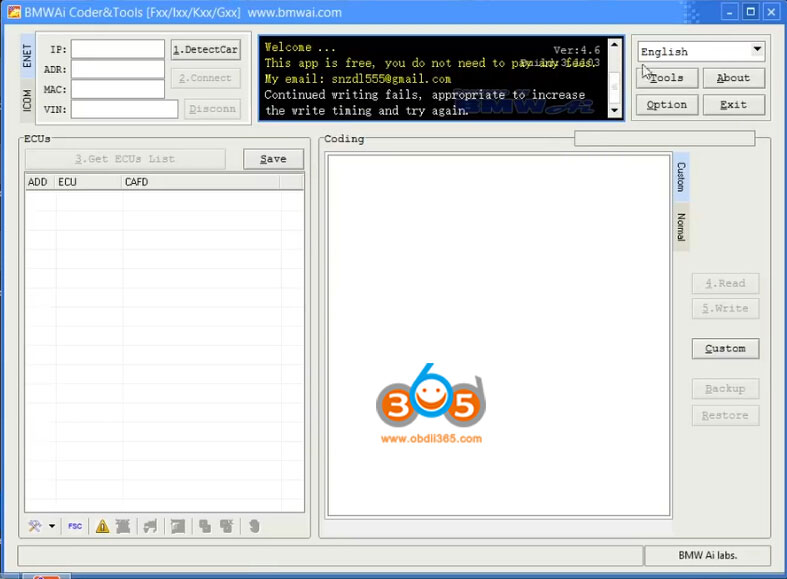
  • BMWAi 4.6
  • E-SYS 3.27.1 and 3.30, Psdzdata V66.1
  • DR.GINI B020
  • FSC Navigation Code Generator
  • DIS Software for Old cars, DISV57 and DISV44,diagnosis and programming for BMW virtual machines.
2019-05-bmw-icom-software-1

2019-05-bmw-icom-software-2

2019-05-bmw-icom-software-3

2019-05-bmw-icom-software-4

2019-05-bmw-icom-software-5
With newer and more software for BMW E, F, G series coding and programming.
Software List:
  • Rheingold ISTA-D 4.17.13
  • ISTA/P 66.0.200
  • BMW PSdZData Tool
  • BMW coding tool
  • E-sys 3.31.0
  • E-sys Launcher Pro V3.1.1.133
  • NCD/CAFD Tool V0.5.2.203
  • Freischalt Tool 02.02.00
  • INPA 5.02 English
  • WinKFP
  • NCS Expert (English/German)
  • Tool32
  • BMWAiCoder
  • FSTool2
  • FscToXml
  • F series CBS RESET
  • NCS Dummy
  • iToolRadar
  • HU Tool v2.6.PRE
  • CIC Special Service Utility v1.0.4352
  • CIC Language Coding Utility Ver. 1.2.2
  • Dr.Gini B021
  • Perfekt Toolbox 0.1a
  • HU-ServiceManager ver.0.2 beta
  • ISN Ver (0.12.04.16)
  • BMW CIC/NBT FSC Generator
  • SW ID Reader (DE) v1.2.1
  • BMW CIC/NBT/EVO Keygen v1.9
  • Swt to FSC
  • BMW Explorer 0.13.7.13 Explorer VMware Workstation
  • EWS Editor V3.2.0
  • IBAC Activation Codes Generator
  • AVTOTOOLS DME/DDE Password Extractor
  • CAS4 Mileage Tool r20140617
  • CAS3+ Editor
  • EWS Editor
  • Siemens MS41 EWS delete
  • DDE/DME SA-option Helper V1.1
  • BMW Coding Database
  • KSD2 12.05.2019
  • ETK 3.1.90
  • etc

Part of MOE BMW software display:
moe-bmw-software-1

moe-bmw-software-2

moe-bmw-software-3

moe-bmw-software-4

moe-bmw-software-5

moe-bmw-software-6

moe-bmw-software-7

moe-bmw-software-8

moe-bmw-software-9

moe-bmw-software-10

moe-bmw-software-11

moe-bmw-software-12

moe-bmw-software-13
 ISTA-P/ISTA-D  Multi-language available in diagnosing, programming and TIS diagram circuit: , British English, German, Spanish, French, Italian, polish, Portuguese, Turkish, Czech, Swedish, Dutch, Indian, Greek, Russian, Simplified Chinese, Traditional Chinese, Japanese, Korean and Thai.


All ISTA-D HDD/SDD are compatible with BMW ICOM hardwares:

Computer requirements:
Dual-core processor, better above I3; over 4G of memory
It is recommended to use Lenovo ThinkPad: T61, T400, T410, T420, T430, X61, X200, X201, X220 X230 and other laptop with Intel chipset, such as I3 I5 / I7 series.

4.16.2019

Does BMW ICOM ISTA-P support Italian language?

As titled, does the BMW ICOM A2/ICOM NEXT ISTA-P support Italian or other language?


Both ISTA-D and ISTA-P support multi-language, including:

ISTA Multi-language available in diagnosing (ISTA-D), programming (ISTA-P) and TIS diagram circuit:  British English, German, Spanish, French, Italian, polish, Portuguese, Turkish, Czech, Swedish, Dutch, Indian, Greek, Russian, Simplified Chinese, Traditional Chinese, Japanese, Korean and Thai.
icom-language

Run ISTA language pack on desktop and choose language you desired:


10.30.2018

ISTA+ V4.12 Expert Mode Activation, Single Module Programming

Does anyone have a solution for Ista+ Programming Expert Mode?
No expert mode available yet for ISTA+ v4.11.12.

This will be an issue in feature, expert mode can get you out of unpleasant work.
For example if you update i update a whole g11 with ista p and if you update kafas you lose fsc codes, so if i deselected kafas, fsc stayed unharmed. But you can do that now with ista+
One more important remark is that esys wont let you update a module that is allready updated, but ista let you do it, so after 7/11 psdzdate you are stuck with this issue too…

Best to use a router for programming HUH etc through ista
Or you can just use tftpd32 (or tftpd64 if 64bit OS)

Update: ISTA+ 4.12.12 has the expert mode – Confirmed!
ista-p-expert-mode-1

ista-p-expert-mode-2

ista-p-expert-mode-3

ista-p-expert-mode-4

ista-p-expert-mode-5
Note that Ista+ expert mode is Ista P expert mode
ista-p-v-4-12
The difference between Expert mode and Ista plus?

The difference is his loader allows for hiding of modules
Ista plus does not he or someone may be working on an alternate loader to hide retrofitted modules but as it so far look into ESYS for that only option I can think of right now last istap that had a lot a F ,G or I cars was 3.64.2 as 3.65.0 only had like 2 model forget exactly which ones you have to double or make link dos command to point to istaplus PSdZ folder

Some new solutions to activate ISTA-P expert mode ?

so updating the folders in ISTA-P with the files from PSdz swe will not do the trick. You will be inserting back all the missing vehicles. I saw in the main series you will have to rename F, G, I series files to reflect.

after copy PSDz (data_swi) to pszdata ISTA P with correction data in mainseries, add data F001, F10,…etc = same result
ISTA P shows window that car is not programmable (only ISTA+)
trick is somewhere else

this is Ista p expert mode confirmed to work 100%


Why not just use a earlier version of ISTA-P (such as 4.08 or 4.10) to do single module coding?
Because what i am getting is there are problematic files out there that BMW knows about and in the latest version of ISTA+ it can stop from a certain update and keep the module on the one that works. So could you not reverse populate for example take the p-files from a later version to a previous but you would need all files and folders for example. anyone with more can chime in


Anyone has good success with Ista P expert mode?
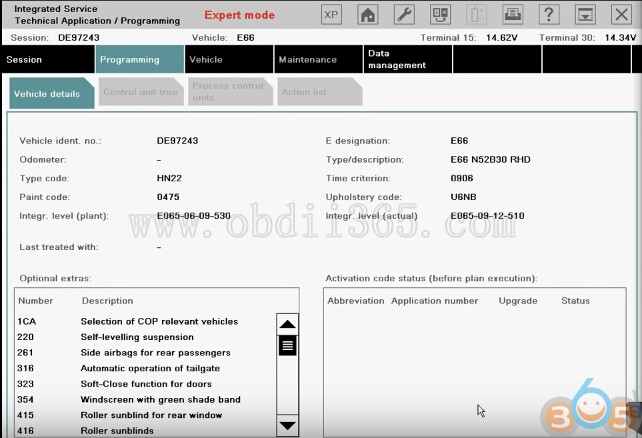
Yep. Have tested Expert Mode on BMW e66
Here is the details…
Select Create new session. Click on Select ISTA/P server automatically. Click on Continue.
ista-p-expert-mode-bmw-e66-1
Click on ICOM Next/ICOM A2 emulator & Connect to continue.
ista-p-expert-mode-bmw-e66-2
Connecting…
Click on on the 4th button at the top, to get the information of Connection manager, then close that interface.
Determining model series…(E66)
Data being checked…
Checking vehicle identification number…(DE97243)
Control unit replaced?
Click on No, and also click on “Before starting vehicle programming…” click on Next.
ista-p-expert-mode-bmw-e66-3
Control unit change over.
ista-p-expert-mode-bmw-e66-4
Determining…
Identifying fitted control units…
Determining target context…
Calculating measure plan…

Go to Control unit tree, and select ZGM.
ista-p-expert-mode-bmw-e66-5
Edit plan show as follows:
ista-p-expert-mode-bmw-e66-6
Go to Immediate measures.
Click on Hide all actions.
ista-p-expert-mode-bmw-e66-7
Go to Edit plan. No cross on Program P. Then close it.
ista-p-expert-mode-bmw-e66-8
Select SZL.
ista-p-expert-mode-bmw-e66-9
Edit plan show as follows:
ista-p-expert-mode-bmw-e66-10
Go to Immediate measures.
Click on Hide all actions.
Back to Edit plan. No cross there. Then close it.
ista-p-expert-mode-bmw-e66-11

Done!


8.29.2018

BMW Battery Registration Guide using ICOM ISTA

BMW Battery Registration


BMWs equipped with an IBS need to know when you replace the battery, battery capacity and battery type must be registered! YOU DO NEED TO REGISTER battery replacements on BMWs with an IBS (Intelligent Battery Sensor).


Why register the battery replacement?


After installing a new battery, the BMW ICOM ISTA service function ‘Register battery replacement’ must be run. The registration of the battery replacement is required to inform the power management (software in engine electronics and intelligent battery sensor) that a new battery was installed in the vehicle. If the battery replacement is not registered, the power management will not function properly and can lead to functions being limited by individual electrical consumers being switched off or having their power consumption reduced. Power management will charge the new battery as if it’s the old worn out battery, causing premature failure of the replacement battery.

Important! If the new battery is not registered, incorrect readings may appear in the display of the on-board computer due to old data in the power management system (check control message ”Recharge battery” appears even though the battery is new).
bmw-icom-register-battery-1

A service function informs the power management in the Digital Engine Electronics (DME) or the Digital Diesel Electronics (DDE) of a battery replacement. The following operations are performed:

-The current mileage reading is stored for the battery replacement.
-The stored measured values (battery charge statuses, current, voltage, temperature, etc.) are deleted.
-The power management is initialized.
bmw-icom-register-battery-2
Available registration options:

1. Replacing battery with exact same type – (Simple registration)
2. Replacing battery with same type but different capacity – (Registration/Conversion)
3. Replacing battery with different type – (Programming/Conversion/Registration)
4. Updating software of complete battery management system

Changes to the charging profile also affects how the Start/Stop system works for vehicles with EfficientDynamics

Car 1:

You’re renewing the battery with identical replacement. You register replacement to let the car know that the battery is new and the charging profile is adjusted accordingly. If you don’t the vehicle will charge for an old battery and cause premature failure.

Car 2:

You fit an AGM in place of a Standard LA battery (or vice versa). If you don’t register the replacement then it will toast the new battery for similar reasons to Car 1 but even worse as the charging profile will be for the incorrect type battery and cause even faster battery failure. In this case you MUST use a ‘conversion’ to change the battery type. Then, register a replacement.
bmw-icom-register-battery-3
Notice! Determination of state of charge after a battery replacement

After a battery replacement, the vehicle must be left standing for at least 3 hours with its new battery. It is not possible to establish with any reliability the state of charge of the new battery until that time. Possible Check Control messages about total discharge of the battery are then no longer displayed.
bmw-icom-register-battery-4
Notes for disconnecting and connecting battery

The scope of application of some systems may be restricted after a power supply interruption. Likewise, individual settings may be lost.

Settings or activations must be carried out, depending on the equipment specification. For example:
Vehicles with automatic engine start‐stop function (MSA): MSA function is active only after learning period (vehicle must not be woken for a period of approx. 6 hours
E46 Perform (four-wheel drive) / E53 / E83: steering angle sensor adjustment
-If necessary, activate slide/tilt sunroof
-If necessary, activate power windows
-If necessary, activate mirror with compass

Only E60, E61, E63, E64, E70, E71, E90, E91, E92, E93: mount steering angle

Skipping the battery registration process can dramatically shorten the life of a battery in these vehicles, be it an AGM or a conventional battery. Several issues can cause premature battery failure, see post on Energy Diagnosis, but on a late model BMW, skipping battery registration can be one of them.

4.20.2018

BMW Rheingold ISTA-D vs. ISTA-P in detail

Due to popular demand we are proud to introduce availability of the new Rheingold BMW Icom diagnostic software suite, consisting of BMW Ista/D (Diagnostic) and BMW Ista/P (Program and Coding) this is the very latest BMW diagnostic software platform, which replaces the original BMW DIS, BMW SSS V32 and BMW TIS software platform on BMW vehicles manufactured after 2009, including the new ‘F’ series BMW’s and with the addition of BMW Motorcycles, it is also fully reverse compatible with older ‘E’ series models.

ISTA/P and ISTA / D will work on all BMW Vehicles, manufactured between 1996 and 2016, and is required on ALL newer vehicles manufactured after March 2009 (which was when the original BMW DIS software platform was retired).

ISTA/D – Read and clear fault memory, wiring diagrams, repair instructions, technical documents, activations, live data, etc

ISTA/P – Program and encode, update vehicle software, retrofits/conversions (i.e trailer hitch, satellite radio, etc)

BMW Ista /D and Ista /P will also work with BMW Motorcycles and BMW Mini vehicles, and gives the same level of access to your vehicles’ control modules as a genuine BMW dealer would have, including Diagnostics, Programming and individual personalisation of the various comfort features and options.

All emulators and security dongles are supplied, and the Interface Cables are included in the package purchase.

The software has multiple language options, including English, German, French, Spanish, Italian, Swedish etc. No need to add language packs or translations.

The software is supplied on a USB 3.0 stick complete with full, easy to follow instructions and will work on most modern, dual core or I-core laptops.

To run this software, you will need to make sure that you use a modern laptop using a dual core or I-core processor with plenty of available memory (4gb minimum), Rheingold will work with both 32 bit and 64-bit versions of Windows XP, Windows Vista, Windows 7, Windows 8 and Windows 10
BMW RHEINGOLD ISTA D & ISTA P DIAGNOSTIC PACKAGE


CLICK HERE TO BUY THE LATEST RHEINGOLD BMW ISTA D / BMW ISTA P SOFTWARE PACKAGE

4.09.2018

How to replace BMW F11 engine control unit?

Case

- replace the used engine module to F11 2012, because the original was totally dead after incorrect power connection during chip-tuning and remained forever in the parking lot. as a consequence of the lack of communication on the table with the processor in the boot mode.


Tool:

BMW ICOM A2/ICOM Next emulator with ISTA-D ISTA-P programming software


How to:

1. Readout of the immo CAS4 data

2. After reading the data, it became clear that CAS4 EWS5 crypto.

3. Next decode CAS4 memory to obtain the synchronization code.

4. Entry of received synchronization code into the new-used DDE741 engine ecu.

5. Change of three VIN codes in the new-used engine control unit.

6. Zeroing the mileage in the new-used engine controller because the mileage in it was 116335km, and in the car 227140km.
replace-bmw-f11-ecu-icom-1

replace-bmw-f11-ecu-icom-2

replace-bmw-f11-ecu-icom-3

replace-bmw-f11-ecu-icom-4

replace-bmw-f11-ecu-icom-5

replace-bmw-f11-ecu-icom-6

replace-bmw-f11-ecu-icom-7

replace-bmw-f11-ecu-icom-8

Note: * The document was translated from Polish. You are at your risk.

2.08.2018

(02.2018) ISTA+ 4.09.33 Standalone SQLiteDB's Download Free

(Feb. 07th, 2018) Free download ISTA+ 4.09.33 Standalone and SQLiteDB’s on Mega.

ISTA 4.09.33 the standalone version
HW checks removed and includes separate link for the NOFASTA patch.

Standalone 4.09.33
RheingoldSessionController_NOFASTA.dll

ISTA 4.09.33 installation files on Mega:
https://mega.nz/#F!pb5U0ATC!Oadp9zVx3SDpcjbQZQM-pw
Files:
BMW_ISPI_ISTA-META_4.09.33.xml
BMW_ISPI_ISTA-APP_4.09.33.21392.msi
BMW_ISPI_ISTA-META_SDP_4.09.30b.xml
BMW_ISPI_ISTA-DATA_DELTA_de-DE_4.09.30.istapackage
BMW_ISPI_ISTA-DATA_DELTA_en-GB_4.09.30.istapackage
BMW_ISPI_ISTA-DATA_DELTA_4.09.30.istapackage
BMW_ISPI_ISTA_DELTA-SDP_4.09.30.istapackage
BMW_ISPI_ISTA-BLP_4.09.30.istapackage
bmw-icom-ista-4-09-33
Password: NOT required!
Security: Unknown – TRY ON YOUR OWN RISK!!!!

Installation tutorial:

Suggestion: you need luck with ISTA+ 4.09.33 as it’s not tested yet by professionals that safety is unknown. And luck also is needed because of the uneasy installation. Hope the installation guide is helpful but note that it would be kind of different from versions, in terms of steps. If you’re not good at this, just buy a cheap HDD or SSD with software inside. A lot of Chinese have crack software with internal disk. Jut buy it with relief.

Look here: 2017.12 BMW ICOM Software HDD ISTA-D 4.08.12 ISTA-P 3.63.0.400 with Engineering Software
bmw-icom-ista-4-08-1
bmw-icom-ista-4-08-2
bmw-icom-ista-4-08-3
bmw-icom-ista-4-08-4
bmw-icom-ista-4-08-5
bmw-icom-ista-4-08-6
bmw-icom-ista-4-08-7
bmw-icom-ista-4-08-8
bmw-icom-ista-4-08-9

Tested 100% and confirmed to work
They offer professional tech support – that’s the most important for newbies!