Showing posts with label carly bmw. Show all posts

5.20.2020

How to register a BMW battery with Carly App?

Here's step-by-step instructions on how to register a BMW battery with Carly. 
You can also use Carly to code a new battery type (Lead-acid vs AGM) or change the battery capacity.
  • Carly for BMW
  • Carly for BMW App
    • Carly for BMW iPhone
    • Carly for BMW Android

Procedure

If you have already paired your Carly, skip pairing steps. We assume that the battery has already been replaced, and now we just need to complete the registration procedure.
Plugin Carly for BMW into the OBD2 port under the dashboard (driver's side). Press the power button on your Carly if it has one. The red LED light will turn on. 
carly-app-bmw-battery-1
Turn ignition to ON position. Don't start the car. You can't register a new battery if the engine is running.

Download Carly for BMW Pro.  The free version of Carly does not allow you to perform battery registration. You can use the free version of Carly for BMW to see how Carly Battery Registration works but you can't complete the registration. Use the free version to check if battery registration is possible for your BMW model and year.

Besides the Carly for BMW Pro, you will need to purchase the Battery Registration add-on which is another $10. Total cost for the Carly Adapter, Carly Pro and in-app battery registration place this setup in the mid $100-$200 range.

Pair Carly adapter with smartphone
carly-app-bmw-battery-2

  1. Turn on Bluetooth on your Android or iPhone.
  2. Search for a new Bluetooth device.
  3. Select Carly Adapter on your screen.
  4. Enter passcode such as 1234 or 0000
Next, launch Carly for the BMW Pro app. On the bottom of the Carly Dashboard, you need to select the BMW model and then hit connect. 
carly-app-bmw-battery-3
Enter Carly Battery Registration menu
Select Battery from the main menu.
Read through all the warnings and scroll to the bottom. Select Continue to battery registration. If you haven't purchased the add-on, Unlock battery registration will appear on this page.

Next, you will see two options. The first is to perform battery registration and the second to code a new battery. If your new battery has different specs than the old battery, you need to complete both coding and registration. If your new battery has the same exact specs as the old battery, you will only need to perform battery registration by pressing "Register same battery type" 
carly-app-bmw-battery-4
Register same battery type (Registration)
When you install a new battery with the same capacity and type as the old one.
Register another battery type (Coding)
Here you can change battery type and capacity. Change from lead acid to AGM. Change capacity between 60, 70 80 90 100 110 etc Ahr. 
carly-app-bmw-battery-5
Notes:
  • Do not stop the app or remove the Carly adapter when you are performing battery registration with Carly.
  • Do not start the car. Ignition should be on. All dash light on. Position II.
  • Read and clear codes from the CAS module before you perform battery registration with Carly. Clear any stored codes from the CAS module.

12.01.2019

BMW Carly vs. Rheingold (INPA, NCS, ISTA-D/-P)

This is for those are researching what he should buy for his BMW.
The option is narrowed on BMW ICOM cable + Rheingold and Carly Pro for BMW + Carly gen2 adapter.

Carly can run diagnostics and code.
It can be installed only on tablets and phones. For what it does wireless connection is sufficient.
carly-bmw

Inpa from BMW standard tools can only run diagnostics.
It can’t code functions. I personally prefer ista-d.
inpa-software
Ncsexpert from BMW standard tools can only code functions.
It can’t run diagnostics. With Ncs dummy companion is very easy tool and error proof.
ncs-expert
Ista-d aka rheingold can only run diagnostics and is full repair manual for all bmw group vehicles.
It requires connection only for diagnostics. You can look up the manual without connecting to the car.
ista-d-bmw

Ista-p is THE programming tool.
It requires icom connection to run properly. Also requires battery maintainer. It can render the car inoperable if things with power go wrong. Never tried it personally.
ista-p-bmw

Summary:

For a code reader, it really depends on the what your looking for.

Carly is a great tool for diagnostics and coding.
Some of the cons of Carly are: takes a while to complete diagnostics on car, at least on the android system I use. Carly cannot do extensive coding, for instance it cannot code out tpms, edc, adaptive headlights etc.

If you want an extensive coding program and diagnostics tool get NCS Expert and Inpa. You can find the software free online.

6.10.2019

BMW CBS Reset Tool Recommendation

Topix: How to reset BMW Service Reminder

How-to: reset various BMW service lights using the ODO reset button and also BMW scanner. BMW service light includes:
  • Front Brake Pads
  • Rear Brake Pads
  • Oil Service Reminder
  • Microfileter (Cabin Air Filter)
  • Spark Plugs
  • Brake Fluid Change

BMW Condition Based Servicing (CBS) system monitors all these services.

It is found on 2002 and newer 7 Series (E65 & E66), 2004 and up 1 Series (E87), 2004 and up 5 Series (E60 & E61) and 6 Series (E63 & E64), and 2006 and up 3 Series (E90 & E91).

BMW CBS can be reset via the instrument cluster or using an OBD2 scanner capable of resetting CBS.

On some BMW models, Factory Scheduled Maintenance (FSM) is used instead of CBS.


BMW Service Lights Explained
bmw-service-light

It reminds the driver to service their car when these items wear. You can check the CBS messages on your BMW via the iDrive display.

On your iDrive select Service Requirements then Status. It will show the state of each component as shown in this picture.

If your BMW needs to be services you will get a message on the iDrive or instrument cluster before each component is due for servicing.


TIPS:

  • Make sure the clock is displayed on the instrument cluster before you start with BMW CBS Reset procedure.
  • The red symbol means the system has not been reset yet. When you successfully reset a BMW service the light turns to orange.
  • You may need to repeat the procedure a couple of times to be able to reset BMW CBS reminder.

Reset BMW Services via Instrument Cluster
  1. Below you will find instructions on how to reset BMW CBS services using the ODO reset button on the instrument cluster.
  2. Turn on ignition by turning key to Position II or by pressing the start button. Do not press the brakes or start the engine. All dash lights will turn on.
  3. Press and hold the RESET button on the instrument cluster for about 10 seconds.
  4. The screen will show a triangle, then one of the service items such as the microfilter symbol or oil can.
  5. Press the RESET button several times until you see the item you want to reset.
  6. Once the item that you need to reset is shown on the cluster, press and hold the RESET button.
  7. After about 5 seconds you should see Reset? or OK?
  8. As soon as you see one of the messages above release reset button then press and hold it for another 5 seconds.
  9. After a few seconds, the selected service will be reset.

Reset BMW CBS using Autel Scanners

Scanners can be: MaxiDAS, MaxiSys series, i.e MaxiSys Elite

Instructions (General steps)

  1. Plug in your scanner into the OBD-II.
  2. Turn on the ignition but don't start the engine.
  3. Your scanner will turn on.
  4. Select European car from the menu.
  5. Select BMW.
  6. Read Auto Vehicle Data.
  7. Select Service Functions
  8. Select Maintenance
  9. Select CBS to reset twice
  10. Select any of the following CBS options to reset it.
  11. Engine Oil
  12. Spark Plugs
  13. Front Brake
  14. Rear Brake
  15. Brake Fluid
  16. Microfilter
  17. Vehicle Check
  18. Select the reset button on the right side of the menu to carry that particular reset.
  19. Press Yes to confirm.

autel-maxisys-reset-bmw-cbs-1

autel-maxisys-reset-bmw-cbs-2

autel-maxisys-reset-bmw-cbs-3

autel-maxisys-reset-bmw-cbs-4

autel-maxisys-reset-bmw-cbs-5

autel-maxisys-reset-bmw-cbs-6

autel-maxisys-reset-bmw-cbs-7

autel-maxisys-reset-bmw-cbs-8

autel-maxisys-reset-bmw-cbs-9

autel-maxisys-reset-bmw-cbs-10

autel-maxisys-reset-bmw-cbs-11

autel-maxisys-reset-bmw-cbs-12

Reset BMW CBS using Foxwell NT510/ NT520 Pro
  1. Plug scanner into the OBD II port and turn on the ignition.
  2. Select BMW
  3. Scan VIN
  4. Select Service
  5. Select CBS Reset (twice)
  6. Select the service you need to reset
  7. Press Enter
  8. Press F3 to carry out the reset
  9. Do you really wish to perform the reset? Press YES

foxwell-nt520-reset-bmw-cbs-1

foxwell-nt520-reset-bmw-cbs-2

foxwell-nt520-reset-bmw-cbs-3

foxwell-nt520-reset-bmw-cbs-4

foxwell-nt520-reset-bmw-cbs-5

foxwell-nt520-reset-bmw-cbs-6

foxwell-nt520-reset-bmw-cbs-7

foxwell-nt520-reset-bmw-cbs-8

foxwell-nt520-reset-bmw-cbs-9

foxwell-nt520-reset-bmw-cbs-10

foxwell-nt520-reset-bmw-cbs-11

foxwell-nt520-reset-bmw-cbs-12

Reset BMW CBS using Carly for BMW

Note: Carly requires paid a subscription in addition to Carly for BMW adapter.

Instructions
  1. Plug Carly Adapter into the OBD2 port.
  2. Pair Carly Adapter with your phone.
  3. Download and install Carly for BMW app.
  4. Open Carly App.
  5. Select your BMW model.
  6. Select Connect then Bluetooth.
  7. Go back to Carly Dashboard.
  8. Select Service
  9. Scan for available functions
  10. Purchase Advanced features.
  11. Once you completed the purchase, return to the app and carry the procedure by repeating the steps above.
carly-obd-reset-bmw-cbs-1

carly-obd-reset-bmw-cbs-2

carly-obd-reset-bmw-cbs-3

carly-obd-reset-bmw-cbs-4

carly-obd-reset-bmw-cbs-5

carly-obd-reset-bmw-cbs-6

carly-obd-reset-bmw-cbs-7

carly-obd-reset-bmw-cbs-8

carly-obd-reset-bmw-cbs-9
www.obdii365.com

9.27.2018

BMW Coding App Bimmercode vs. Carly vs. BimmerLink

What's the difference between Bimmercode, Bimmerlink and Carly?

Which one is best?

Which one is easier to use?


The three apps I could find and ultimately am reviewing are Bimmercode, Bimmerlink and Carly BMW. Let's break down the price first:


Bimmercode
Vgate iCar 2 Mini WiFi OBD - $22.99
BimmerCode App - $29.99
BimmerLink App - $29.99
Total for setup = $82.97 (plus local taxes)


Vgate icar 2 is the cheapest option, better use Vgate iCar 3.0 BT and Vgate iCar Pro 4.0 Bluetooth which has higher transmission rate.

vgate-icar-2


vgate-icar-2-3.0


vgate-icar-4.0


Carly BMW
Carly BMW Gen 2 WiFi OBD (iPhone) - $88.55 (not the best price)
Carly BMW Pro App - $44.99
iDrive Coding Add On - $14.99
Service Reset Add On - $4.99
Battery Registration Add On - $9.99
Total for setup = $163.51 (plus local taxes)

carly-bmw-app-1


carly-bmw-app-2

carly-bmw-app-3

Note* Now you can use Carly for BMW Pro cracked without special connector. Use default Bluetooth or WiFi OBD II adapter. Get the most out of your BMW by keeping it healthy, personalized and connected.

carly-bmw-app-4

I will compare what the apps do not share in common (features only available in one app). I will give my final thoughts on each app and final verdict.

A key note is that buying BimmerCode and BimmerLink will land you at the same price as Carly BMW Pro + iDrive Coding Add on. $60 and the apps try to be identical. Both will code/diag. The Lite or Free versions of both apps are for testing compatibility only.

*If you are using an Android phone, your only choice is Carly BMW. The reviews today are based off the iPhone apps. Bimmercode is iPhone ONLY*


General: Bimmercode

bimmercode-app


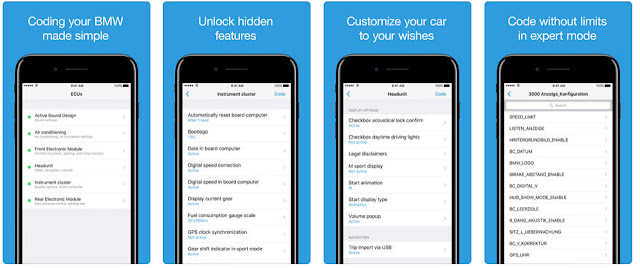
Bimmercode is unique in the sense that it splits its features into two individual apps. Both apps use the same OBD connector so no need to worry about purchasing another device. The interface is clean and easy to use. Cost savings can be had if you ONLY want to code. The BimmerCode app, codes, and thats about it. Unlike Carly BMW it does offer an advanced setting which looks to closely match the ability of dealership scanner. The modules turn to German text and the list grows very very long. Unfortunately, I am no expert, and really can't comment on how well Expert mode works or its ability to compete with a full PC/Software based setup. More on Expert mode later.

General: BimmerLink

bimmerlink-app

The BimmerLink app does the Sensor Values, Dashboard Values, ASD, and Exhaust Flap. Its the services app. BimmerLink has no official website and BimmerCode's website is pretty much just a landing page for the app. The website offers no insight as to the future direction that the apps will be taking. Additionally, it only covers Fxx Series BMWs and above.

General: Carly BMW

carly-bmw-app


Carly BMW packs all of its features into a single app. Ability to do everything via the Carly branded OBD connector. The interface is also clean and easy to use. The punch to the face comes when you purchase the Pro version only to find out that you must dole out more cash for Add-On packs. While you do get lifetime updates to both the connectors firmware and any features/packs you already purchased, it's fair to assume that any NEW Add-Ons will cost you. Carly BMW offers several additional features that Bimmercode does not(Service reset, Battery Programming, Used Car Check, Etc).

Unlike BimmerCode's website, Carly BMW's is full featured. Providing manuals, feature lists, and a spot that shows current projects/status. Carly promises to continue to update the app and the project list supports this claim. It covers both Exx and Fxx Series BMW's and above.


What the Apps do the same:
Diagnostics: Both apps appear to do the same. However BimmerLink fails to sort or translate into English. Carly BMW takes quite awhile longer to scan for errors, but offers the benefits of being able to scan all or select a specific module/s for scanning.


Coding: I can't do a full side by side comparison of every single possible feature. Both company websites have the full coding lists separated out by BMW Model. They match what many of the "Remote Services" offer. They backup the current reading and then allow you to code what you like. This is done on a module by module basis. Each module controlling certain features. BimmerCode was a major let down, while claiming to offer full coding on my model, I was only able to access 4 modules. Carly BMW had no issues accessing and coding them. Here are some screenshots: (Using one Module on each app as a display)


Exhaust Flap: For models that have an exhaust flap that opens or closes based on how heavy your foot is, both apps provide the ability to manually open or close it. Device needs to remain plugged in and connected to your iPhone. BimmerLink reported this was not available for my car and Carly BMW did give me the option. No screenshots as it's really a ON/OFF toggle.

Parameters / Sensors & Dashboard:
Both apps allow you to add and then track certain sensor values. However, (again) BimmerLink fails to translate in English. Carly BMW while limiting you to 6 parameters, does translate for you. Here are some screenshots:


What the Apps don't do the same:
This section is going to lean heavily in Carly BMW's favor. For a price, Carly BMW can do alot more. Let's start with Bimmercodes app's unique features:

BimmerLink
ASD or Active Sound Design is essentially using the speakers to create noise that sounds like your engine. I could not find this option in Carly BMW. However, the option was not available for my car using BimmerLink. I would assume it's just an on off toggle. No screenshots.

BimmerCode
Offers Expert mode which could be golden for the more technical coders. Unfortunately I don't know enough to give an in-depth analysis of this feature. But it looks to be a way to adjust the core values on each setting. However, this list is limited to the modules you can access, which was only a few on my car. Here is a screenshot: (Using coding module from above)


Carly BMW
Used Car Check: Essentially scans your car for parts that track miles. It will then analyze the miles vs your odometer. While no tampering was found on my car, it is a curious and potentially useful feature when it comes time to buy another car. Here is a screenshot:


Service Reset:
Does exactly what it says. Offers a quick way to reset the iDrive service settings. Here is a screenshot:


Battery Reset / Programming: Does exactly what it says. Allows you to program in a new battery. At $10 this is extremely useful, even if you only replace the battery once while owning your car. That savings alone pays for the entire app.


DPF ($9.99): I did not purchase this option as I don't have a Diesel car.


OBD Functions: I did not run this function during testing, but I do hope it comes in handy when I replace those o2 sensors.

Final Thoughts:

For my 2011 F10 535i, Carly BMW is the clear winner. Its easier to use and offers alot more functions than Bimmercode does at this time(For a price). While I assumed that Bimmercode will continue to get better, Carly BMW has a full company backing it. I don't see Bimmercode surpassing Carly BMW at anytime in the future. Overall I was disappointed with Bimmercodes apps. While the interface is cleaner and a cheaper setup, the non English translation and lack of available codings really hurts. Granted newer Fxx series may offer greater compatibility with BimmerCode, I cannot personally recommend it at this time. I still wanted to write the review since Bimmercode is cheaper and may do enough for some people at a much lower costs, it's just not as polished.


Suggestion:

It really depends on what your budget is.The biggest issue I have with BimmerCode is that it lacked support for two of the 6 modules in my car. Carly BMW can code all 8. If you have the money, I would go with Carly BMW at this time. If you are looking for the cheapest possible route than BimmerCode is the way to go.
Vgate iCar Pro Bluetooth 4.0 OBDII scanner for Android & iOS