
In this entry: step-by-step diagnostics of, possibly, one of the most complicated engine management system of all times. Each of stages is kept as short as possible, references to previous posts for much more detailed information will regarding each knot/ theme be inserted.
Tools, used for diagnostics:
1. INPA loader 2.023; with OBD to USB connecting cable;
2. ISTA-D;
3. ELM327 with any of free-of-charge software, which can read OBD mode 6 data.
If any additional tools will be required, it will be marked in the specific section.
Preparation
1. Saving existing freeze-frame on the computer.
freeze frame is seen using INPA:
a) ../F4/F1/F3
b) ../F4/F2/F3
Information regarding each error message is displayed in separate “screen”. There are several ways, how to save information: you can print in on the virtual printer using INPA tools, it can be saved as a screenshot, or even take a picture with a mobile phone – it has no fundamental significance.
This is the very important stage of preparation! Error messages, recorded before, will give a lot of information in case of hidden defects!
2. Deleting existing error messages.
Deleting old error messages is important because only after this procedure the engine will try to restore normal functionality. The error messages (even with passive status) can define, that the damaged elements (or registered as damaged before) and the engine can switch to alternative (emergency) modes.
The error messages, which are marked as active (vorhanden) will restore immediately (during several minutes). If the error messages restore immediately – obviously, MSD80 has reason to “believe”, that current problem is present. Usually, active status (starting new driving session) is maintained by:
error messages of sensors and/or actuator connection;
specific error messages, for example, 30E9, 30EA.
specific error messages, for example, 30E9, 30EA.
If MSD80 restore any of error messages immediately – this problem has to be solved before continuing with diagnostics. As the restored ones are “simplest” error messages, the damaged element is clearly stated in them. In this case is very convenient to use ISTA-D, choosing the option “Calculate test plan”. ISTA D contains schematics and “step-by-step” instructions, how to check the damaged knot.
Note: make special attention to errors 30EA and 30E9 (also: 29F4, 29F5, 2A26, 2A27, 2AF2, 2AF4, 2AF6 30DA, 30E0, 2EAE, etc.). If at least one of these errors are stored, following data may be incorrect:
- voltages of warmed-up Lambda probes
- Lambda values of wide-band probes
- Rough run data
- cylinder’s individual adaptation data
- learnbits of injectors adaptations
- misfire counters
and errors relating fuel mixture, misfires, Lambda probes, the performance of CO converters may appear without justification.
The engine should perform Stratified charge (Lambda of wide-band probes 2,0 .. 3,0) at medium loads (50 .. 90 km/h; 5/6th gear). If Engine performs Homogeneous injection only (with Lambda around 1,0) for a long time (more than 10 .. 15 min driving at medium speed/load) without errors displayed in the error message memory, check NOx converter status as described at p.3/part2 ‘Check the condition of NOx catalytic converter’ and follow instructions before continuing diagnostics.
In this entry we look at the situation, which does not fit in scenario of simple algorithms of ISTA D, it means, the engine, for example, is working unevenly; the defects are sporadic (for example, error messages regarding fuel trim, misfires etc.).
The typical user of N43/N53 has already tried most popular ways of repair – replacing spark plugs and ignition coils; at least half of them has already replaced also injectors, HPFP.
Note: the possibility of most popular exchangeable elements:
1. Spark plugs. The necessity to replace: average. N43/N53 uses multi ignition, it means, till 5 sparks one time (if it performs in Stratified charge) – the spark plugs are wearing out several times faster than in “regular” engines.
2. Ignition coils. The necessity to replace: very high! Unfortunately, even ignition coils, produced by Bosch (which are renowned for their longevity) can quickly get out of order. Reason – constructive defect of MSD80. Unfortunately, not many owners of N43/N53 engines allow interference in car’s electrical system – snubbers are installed in very rare cases, and the problem with ignition coils is still present. Snubbers, described in current entry, offers a radical and very efficient solution for coil damaging problem.
3. Injectors. The necessity to replace: comparingly low, very often injectors are replaced without reason. Even more – due to the incompetence of services (sometimes even dealer centers), it’s offered to replace all set of injectors, not even identifying the “guilty” one.
Diagnostics in idle
1. Checking cold Lambda probes for switched off engine
a) turn on the ignition, don’t start the engine;
b) open Analog values block No.6: ../F5/F2/F6

c) evaluate two bottom bar lines;
bar of the left side has to show: 16K Ohm; a bar on the right side has to show: 65K Ohm;
d) open menu of fuel mixture ../F5/F6;

e) check the voltage of the control probes, it has to be 0,42V for N53 engine (both banks) and 0,42 V for 1st bank in case of the N43 engine;
f) check wide-band probe voltages, probes for both banks has to be 2,0V +/-10%
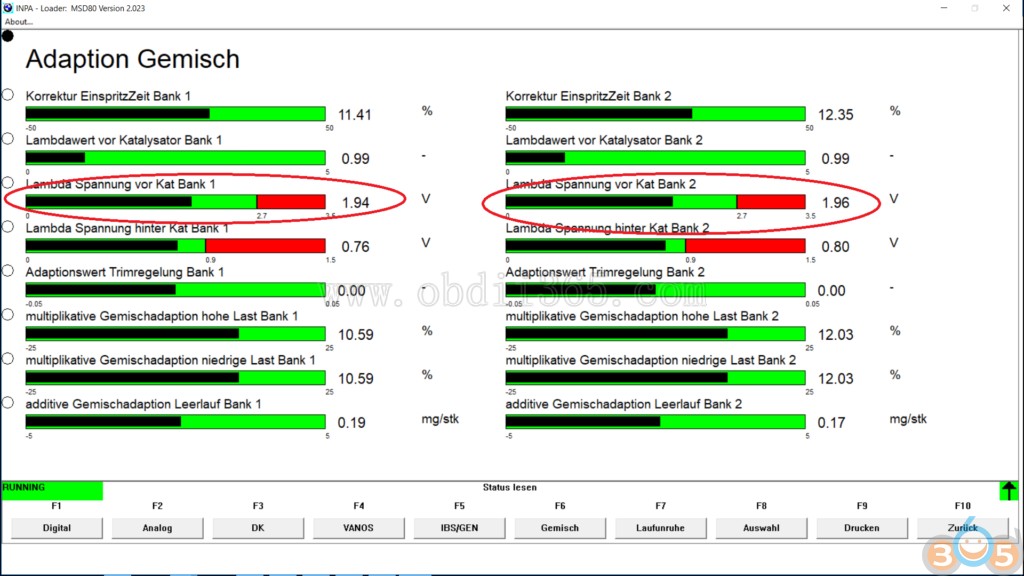
If the values are different from ones mentioned above, continue with further research.
2. Checking injectors for leakage (especially efficient – for cold engine)
a) open menu for fuel mixture: ../F5/F6;
b) start the engine;
c) wait, till MSD80 starts to heat up the wide-band probes (bar of the first line reaches 99% after several seconds stabilizes limits of 30 .. 60%;

d) observe Lambda values of wide-band probes;
e) observe values of integrators.
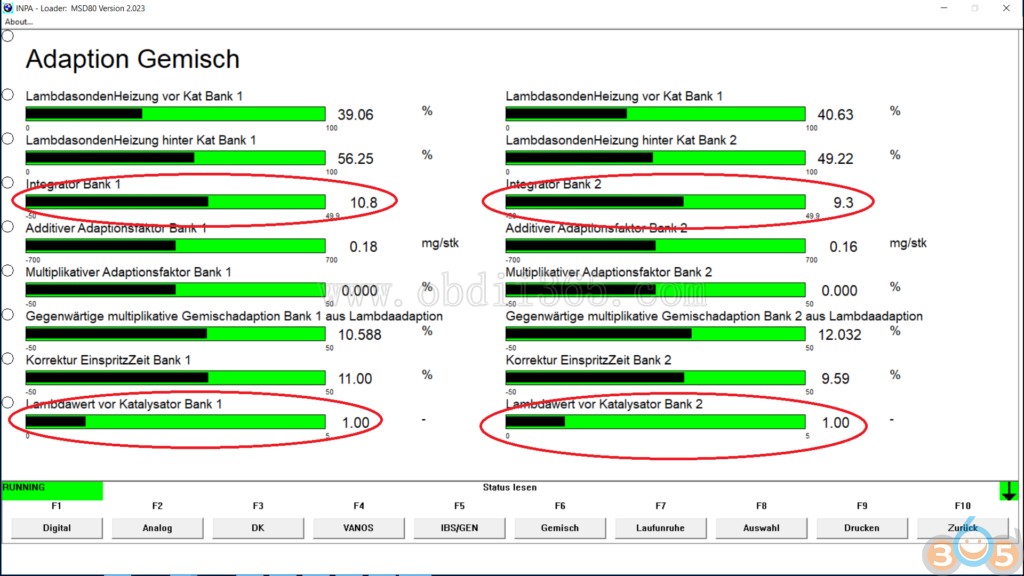
If Lambda values are significantly different from 1,00 (in case of typical defect: below 0,97, but also values above 1,03 are incorrect), and if integrators “jump” out of -15 .. +15%, carry out the more detailed test for leakage of injectors.
Note: if wide-band probes are not heated within 30 .. 60 seconds after engine start, check learnbits as described at p.1/part2 ‘Check learnbits’ and follow instructions.
3. Checking Nernst resistances of heated Lambda probes
a) switch on the engine, heat up for 5 minutes;
b) open menu of fuel mixture: ../F5/F6;
c) check, that all four probes are being heated up (bars of first two lines shows 30 .. 60% PWM);

d) open Analog module 6: ../F5/F2/F6;
e) evaluate Nernst resistance values (bars of two bottom lines)

If Nernst resistance values are 0/256/512 Ohm: probes are heated up and their chemical efficiency is acceptable.
1024 Ohm and more – the probe has aged or is damaged, it has to be replaced.
Note: if all Lambda probes are not heated within few minutes after engine start, check learnbits as described at p1/part2 ‘Check learnbits’ and follow instructions.
4. Checking Lambda probes
a) heat up the engine till work temperature;
b) keep the 2000 .. 3000 RPM for at least 10 seconds;
c) open test module for probes: ../F9/F3

d) press F1, to perform the test.
Correct results of the test: Lambda 0,90/1,10 (+/-0,01) for wide-band probes, <0,1/>0,8V for control probe (1st bank for N43) or probes (both banks for N53).

Typical defect: control probes generate a lowered voltage. If the test voltage identifies <0,8V, the probe is aged or clogged, it has to be replaced. After replacing:
a) delete adaptations (2nd group) ../F8/F2/Shift+F9,
b) create new adaptations.
5. Checking the crankcase ventilation
a) if the test is performed at cold engine – wait, till wide-band Lambda probes are heated up (see above);
b) turn on the fuel mixture menu ../F5/F6;
c) observe the integrators and offset type adaptations;

d) slowly open the oil fill cork.
If integrators are growing rapidly and reach +20 .. 30% during few seconds or the offset adaptations are being rewritten (are increasing), the crankcase ventilation valve does not work properly.
Note: a test of crankcase valve should be performed in Homogeneous mode. Control Lambda values of wide-band probes (should be around 1,0).
6. Evaluation of intake manifold air-tightness
a) open menu of fuel mixture: ../F5/F6 (wide-band probes should be warmed up);
b) evaluate offset type adaptations;
c) evaluate integrators.

If the offset adaptations are highly above 0 (above 1,5 .. 2,0 mg/stk) and/or integrators reach +15 .. 20% (with normal and stable fuel pressure) in both banks, air suction in intake manifold is possible. Check the air-tightness of the intake manifold (with the smoke test), eliminate air suction. Additionally – check the air-tightness of EGR valve (manually blocking the channel of EGR valve). If offset adaptations are going back to normal – solve the problem with EGR system (EGR valve is closed, when idle).
7. Checking the fuel pressures
a) open Analogue value, block No.6: ../F5/F2/F6;
b) observe bar No.5 and No.6 on the right side.

Value of low-pressure has to be 5000 hPa, maintaining stability: 4950 .. 5050 hPa, not worse;
high-pressure value has to be 150.000 .. 200.000 hPa, jittering (short-time unevenness) – not more than +/-2000 hPa. If difference or higher instability is observed, perform additional fuel supply system test.
8. Checking VANOS jittering
a) open VANOS menu: ../F5/F4;
b) evaluate offset adaptations for both camshafts. If any of them is outside +/-7,0 .. 8,5%, perform the repair of VANOS (it’s mounted incorrectly);

c) press accelerator pedal and keep 2000 .. 3000 RPM. Evaluate differences in inquired and measured position. If the differences are higher than +/-0,5 degrees, perform more detailed evaluations of VANOS knot and, if necessary, perform the repair.

If the instability of VANOS is observed, definitely check the stability of oil pressure.
9. Stability of oil pressure (can be skipped, if VANOS works stable)
a) open menu of oil pressure: ../F6/F2/F2, observe inquired oil pressure if it fluctuates strongly (above +/-100 hPa);
b) evaluate PWM of oil pressure valve

If PWM of the valve reaches 99% and/or oil pressure fluctuates strongly, perform more detailed inspection of oil pressure system
Note: reduce the value of inquired oil pressure by 1000 hPa, evaluating the inquired values.
10. Evaluation of misfire counters
If cold engine works significantly unevenly, check misfire counters.
a) connect the ELM327 adapter, open its software, OBD mode6;

b) evaluate cylinder misfires of the actual session (and inter-sessional counters);
If misfire counters of any of cylinders are strongly different from 0, evaluate spark plug and ignition coil of this cylinder.
If the spark plug is covered with black residue – most likely cause: leaking injector.
For control – replace the spark plug with a new one, repeat the test.
If there are suspicions regarding leaking injector, take it off and send it to testing/cleaning.
Note: if the engine has errors relating NOx system, data reported by Rough run/misfire counters may be incorrect! Fix problems with NOx system first.
11. Evaluations of the Rough run.
a) open menu of Rough run: ../F5/F7;
b) is the status of flywheel adaptation in inactive (colorless) – the adaptation of flywheel is not performed, indications of cylinder efficiency can be incorrect.

c) evaluate measurements of mechanical efficiency of the cylinder.
Decreased mechanical efficiency – increased (above 0) bar value.
Attention: cylinders marked in firing order! (It means, 1-5-3-6-2-4 for 6-cylinder engine or 1-3-4-2: 4-cylinder engine).
If any of cylinders regularly shows decreased efficiency (bar strongly larger than differences of other cylinders form 0), there is the reasonable suspicion regarding the incorrect performance of the injector. Check opening times for injectors (description below), send injectors to testing and cleaning.
Note: different software releases can have very different sensitivity regarding unevenness of cylinders. There are MSD80 software versions, which would identify significant unevenness with bar differences 1,000 .. 1,500; there are software versions, which would identify significant unevenness with bar differences 0,010 .. 0,015.
That’s why it is very important not to evaluate absolute values of bar differences (it can be small and far from red sector), but identify the cylinder, which differs most from others (bar value is positive against others).
If the unevenness of cold engine is especially significant in first few seconds after start, move this test stage as second after Lambda value test for switched off the engine.
If MSD80 will detect the unevenness for a longer time, it will try to solve this problem, changing the opening time of the injectors.
If the engine has errors relating NOx system, data reported by Rough run/misfire counters may be incorrect! Fix problems with NOx system first.
12. Checking opening time of injectors
a) open the injector opening menu: ../F5/Shift+F6/F1

b) evaluate the differences in the injector’s opening time
If the opening time of any of injectors is significantly different (for more than 20 .. 25% from average opening time of other injectors) – send the injectors to cleaning and flow-rate test.
Note: Repeatedly compare the opening time of injectors with Rough run menu data. In both cases:
a) with similar injector opening, there is a large difference (more than 20 .. 25%) in Rough run values;
b) with the balanced mechanical efficiency of the Rough run (after a while), the opening time of anyone injector is significantly different (more than 20 .. 25%) from others.
Mark the cylinder, who is ” different”, check it’s injector, clean it (it would be recommended for all injectors) or replace it.
The set of above-mentioned processes will guarantee, that the “guilty” cylinder or knots will be identified in idle, both for the cold and warm engine.
In idle, N43/N53 series engine runs only in Homogeneous mixture mode (also warm engine, directly after switching on, if the RPM are not increased), accordingly – the diagnostics, which should be performed for Stratified charge mode, is not possible. The description will follow.
If the engine in idle runs smoothly, but unevenness is detected only at mid/high loads, and previous test stages didn’t show any deviations from the norm, continue the diagnostics with the driving session, during which you have to observe necessary parameters.
Before driving session
1. Check learnbits
a) open learnbits: ../F5/Shift+F6/F2
b) if the learnbits of the first line for some reason are not colored, the engine for some reason has not performed initial adaptations!

Perform several short driving sessions, driving smoothly end evenly for some 10 .. 15 minutes with speed 60 .. 90 km/h, holding a pause in idle for 5 .. 10 minutes. Make sure, that the upper learnbits are colored.
If the learnbits of the first line are colored, the creating of adaptation continues, till following learnbits are getting colored:
X;X
X;X
0;0
X;X
Note: If the engine doesn’t start to color the learnbits, check the coding of injectors, If the second row, first/second line learnbits are not colored, the engine has hidden problem with NOx system (30EA; 30E9 errors). Fix NOx problems first!
2. Evaluate multiplicative adaptations of fuel mixture
a) open menu of fuel mixture: ../F5/F6

b) evaluate the multiplicative adaptations.
If the multiplicative adaptations of both banks differ (in one direction) for more than +/-20%, pay special attention to the high-pressure sensor (its indications can be incorrect), coding of injectors (the flow-rate could be inappropriate), definitely the Lambda probe test has to be performed.
If the multiplicative adaptations of both banks have large difference (above 10 .. 15%), pay special attention to Lambda probes and perform the test; also injectors have to be evaluated (pay attention to Rough run test).
3. Check the condition of NOx catalytic converter
a) open the menu of NOx catalytic converter: ../F9/Shift+F3/F1

b) if the pollution level of NOx catalytic converter is 0 mg, most probably, the MSD80 had registered error message 30E9. Solution: follow the description of the current error message, when the normal performance of NOx catalytic converter is restored – create new adaptations and perform the tests again.
c) if the pollution of NOx catalytic converter is above 2000 mg (or 30EA is stored), perform the session of forced desulphation. After repeating the tests.
4. Check the thermostat
a) warm up the engine, open Analog values, module 6: ../F5/F2/F6
b) evaluate the working temperature of the engine;

c) evaluate the temperature of the oil, coolant (before/after radiator)

All indications have to be reliable. If any of sensors shows inadequate temperature, solve the problem with a current knot. The engine has to warm up to (at least) 90 oC. If the temperature of the engine is lowered, check the performance of thermostat. If necessary, replace them. The more detailed description regarding thermostats here.
5. Check performance of NOx sensor
a) open menu of the NOx sensor: ../F5/Shift+F2/F1
b) warm up the engine to 90 oC; start the movement, drive with at least 20 km/h;
c) warm up the exhaust at least till 220 oC;

d) during two minutes, the NOx sensor has to start to report NOx value, which should be different from 0 ppm. If the NOx sensor continues to display the value of 0 ppm, perform a more detailed examination. If necessary, the NOx sensor has to be replaced.
Driving sessions in problematic mode
Try to drive in mode, where the unevenness can be observed.
Typical modes, when the defects can be observed:
1. Kick-down mode by low RPM (below 1500 .. 2000) – ignition problems (spark plugs, ignition coils);
2. Mode with maximum lean fuel mixture (50 .. 60km/h, gear 6, Stratified charge: required Lambda around 2,5 .. 3,0)
a) ignition problems (spark plugs, ignition coils);
b) incorrect Lambda (reaches 4 .. 5) – problems with adaptations, their creating;
3. changing mode (for example, smoothly pressing/releasing accelerator pedal, driving with speed 50 .. 60 km/h) – VANOS (jittering, position errors), throttle (jittering, reaching the position);
4. in the moment of rapid opening of throttle – problems with fuel pressure (LPFP, HPFP).
5. unevenness of torque (smoother than in cases of misfire) – VANOS (jittering of positions).
In problematic mode:
1. observe Lambda of both banks and the performance mode of the engine
a) open fuel mode menu: ../F9/F1

b) observe Lambda for both banks
If misfires start with increased Lambda (above 3,0) obviously, there is a problem with adaptations. If the old adaptations have been deleted recently, allow the engine to perform in other, similar modes (for example, with slightly higher speed/load), so the engine can perform correct Lambda value adaptations for both banks;
c) if the unevenness can be felt when the engine switches to the Homogeneous mode and back to Stratified charge;
a) allow the engine repeatedly switch to these modes (when/if MSD80 will identify the problem in the moments of switching, it will perform throttle jittering adaptations);
b) update the software – newest versions of MSD80 software perform the switching more slowly and smoothly – the unevenness cannot be identified (if all component of the engine is in work order).
2. Check misfire counters
a) connect the EML327 adapter;
b) read misfire counters;
c) for the reliable result: switch off/on the ignition, evaluate the counters once again after unevenness. Solve the problems with the cylinder, identified with misfire algorithm (start the solving of a problem with the cylinder, who’s misfire counter identifies the larger number of misfires).
Note: perform the test on the even road. The effect of the uneven road to misfire counter.
If the engine has errors relating NOx system, data reported by Rough run/misfire counters may be incorrect! Fix problems with NOx system first.
3. Check the performance of VANOS. It is possible, that the inquired and measured position in these modes are significantly different. If significant differences are observed (short term – by several degrees; long-term + jittering – not more than +/-0,5 degrees:
a) check the stability of oil pressure, as described above. If the oil pressure is unstable – solve the problem with oil pressure. If the oil pressure is stable,
a) solve the problem with VANOS.
4. Observe Lambda jittering.
a) open the Lambda and work mode menu: ../F9/F1

b) observe Lambda in both banks in Stratified charge mode, evenly (ideally – using cruise control) drive with speed 60 .. 90 km/h.
If significant Lambda jittering while the engine performs the Stratified charge (Lambda is 2,0 .. 3,0) is observed (rapid value changes up/down for more than +/-5% from Lambda value) – the cleaning of injectors has to be done. Obviously, the amount of injected fuel or beam is unstable.
Additionally – check the stability of LPFP and HPFP in current moments, as described above.
2. Evaluation of spark plugs
a) screw off the spark plugs
b) compare the color of the insulation
If the insulation is Black, not light grey, most probable cause – leakage of the injector. Send injectors to leakage test and cleaning. If the cleaning doesn’t solve the problem – replace the damaged injector. If exactly any of bank’s spark plugs is darker, perform the following test.
6. Evaluation of Lambda in Homogeneous mode
a) open the menu of engine modes: ../F9/F1
b) switch the engine to Homogeneous mode, pressing F1.
Evaluate the Lambda values in both banks in different modes. If Lambda in any of the banks (except the rapid increase of speed) is below 1,00, perform an additional test of Lambda probes. Possible cause of the defect: the lowered voltage of the control probe (the probe has clogged and/or is aged).
Note: after test, switch off the Homogeneous mode: mode menu ../F9/F1, press F5
7. Evaluation of the adaptation creating for injectors
Perform the driving session for 10 .. 15 minutes with even driving conditions (50 .. 100km/h), let the engine run idle for 5 .. 10 minutes. Repeat several cycles.
a) open the menu of injector adaptations: ../F5/Shift+F6/F3

b) evaluate the measured data if the injectors. Normal differences are up to +/-5%
c) open the efficiency measurements of Stratified charge idle: ../F5/Shift+F6/F5

d) evaluate the measurements of efficiency. Normal differences: till +/-0,5 mg/stk
e) evaluate total corrections of the injectors: ../F5/Shift+F6/F1 (lines 4 to 6)

If any of injectors shows very high differences – perform the test of the injectors, if necessary – clean it or replace it.
When the repeated test is performed, the differences in cylinder efficiency have to reduce substantially. If they still are significant, make the notes, which cylinders are regularly changing their measured efficiency, perform the test of injectors of them (flow-rate and leakage).
All the procedures described above provide a clear view of all major possible problems of MSD80.


