6.07.2021

BMW ICOM Next Firmware Update to 1.44

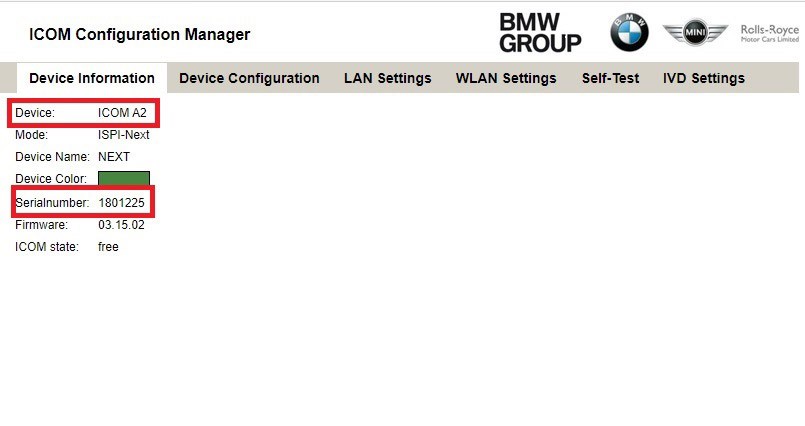
 Available with BMW ICOM firmware update with latest ISTA, I’m posting here the images for both ICOM A2 and original Next firmware.

Upload via x.x.x.x:60080 url.


https://mega.nz/folder/qy5EmZwK#-cqyZ6fFpS-EyUvDzOVP_Q

including ICOM A2 and ICOM Next

ICOM applicationImage 01.44.00

ICOM BootImage 01.28.00

icom firmware 1.44 download 1

Suitable ICOM A2: Item No. SP168-D


ICOM Next app 010108

ICOM Next rootfs 010106

icom firmware 1.44 download 2

Suitable ICOM Next: SP269-1, SP269-B1SSP269-BSP269-B1


How to update BMW ICOM firmware V1.44?


1.Download BMW ICOM V1.44 firmware update file

  1. Please connect BMW ICOM A2 with computer using internet cable, power ICOM by 12V power adapter or from 1x DLC
  2. Unzip ICOM FW v1.44 upgrade files.
  3. Open IE Internet Explorer, enter address http://169.254.33.45:60080/ if you update Perfect version BMW ICOM, log in with

username: root

password: NZY1150263 
PS: to upgrade common version ICOM A2 A1, browse http://169.254.92.38:60080/  and the next steps are the same.

  1. Click “Update Firmware”, you will see ICOM firmware version information.


  1. Click “Browse” to select file “ICOM-BootImage-01-28-00.bin”, set image type as “SYSTEM”, click “Send the file”.
  2. When it pops up “Write the image file to the flash?”, click “Yes”, then ICOM indicator light will turn red.
  3. When it pops up “The SYSTEM IMAGE update was successful”, click “Update Firmware”.
  4. Choose “ICOM-ApplicationImage-01-44-00.bin”, set image type as “APPLICATION”, click “Send the file”, it will spend several minutes since the file is a little bit large.
  5. When it pops up “Write the image file to the flash?” click “Yes”, then the ICOM indicator light will turn red for the second times.
  6. When it finish upgrading, click “reboot”.
  7. Click “Home” – “Update Firmware”, you will find ICOM A2 firmware update to the newest version:
    Current SYSTEM IMAGE version: 01.28.00
    Current APPLICATION IMAGE version: 01.44.00


Additional Note:
Please be sure your computer is to obtain IP address automatically.


Have fun!


www.obdii365.com

5.23.2021

How to Repair BMW ICOM Next Clone?

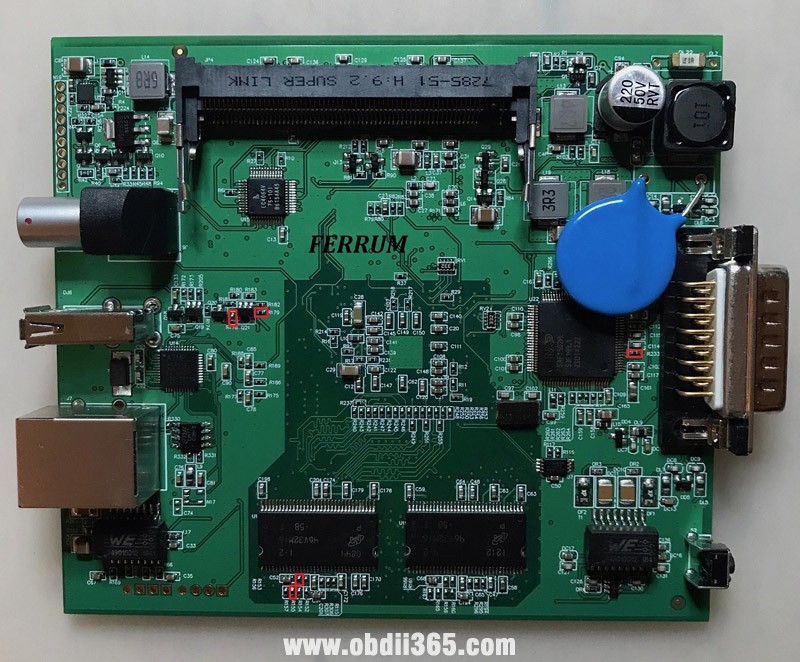
 Lots of people need ICOM because they have no more desire for various cables.  Here is a DIY BMW ICOM Next clone modification guide to solve errors made by the manufacturer affect the connection with machines of different years and models.

ICOM sees only one 128MB memory bank, and it should be 256MB. After fixing all the errors, you can check the work with cars and motorcycles of different years and models. Diagnostics of coding and programming were checked, no errors were detected.


Disclaimer: Thanks Ferrum for all the information. We are not holding responsibility for the damage.


All manufacturer errors  NEW ICOM NEXT China clone
swap

R292<->R293 

R155<->R156

R178<->R179

solder

R15  52ом 

replace

R119  1к

R280 R285 R195  38к

Y4 active  33000  3.3v

*(33.333 must be replaced by 33,000. Antennas need to be glued from the outside to the side plates)


repair-icom-next-clone-1

repair-icom-next-clone-2

repair-icom-next-clone-3

repair-icom-next-clone-4

repair-icom-next-clone-5

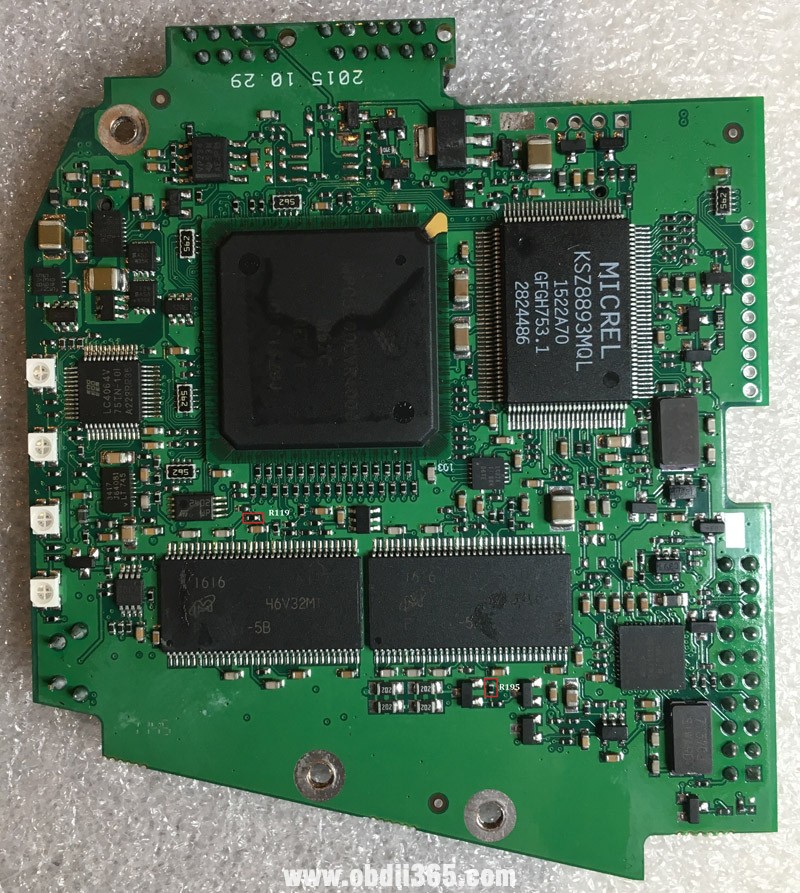
There are ICOM2 clones with the same manufacturing errors. You can understand this by the amount of memory or if R195 = 0kom

Such a board has exactly the same errors. R119 is installed 10kom instead of 1kom. This disables one memory bank.

repair-icom-next-clone-6


Test and feedback:

Reset switch works, resistors replaced, serial changed. Icom now sees 256 memories, managed to update ICOM Next to version 03.15.04. Now icom starts up faster.

repair-icom-next-clone-7

repair-icom-next-clone-8

repair-icom-next-clone-9


4.06.2021

Godiag V600 BMW Problem Solved by Update New License

 Feedback: Godiag V600-BMW Interface works with ISTA – D ISTA-P after updating the new Version.

godiag-bmw-works-after-update-new-license-1

godiag-bmw-works-after-update-new-license-2


This video is on how to operate ISTA-D ISTA-P:


And How to update Godiag V600-BM firmware and license, please refer to this manual:

https://www.obdii365.com/upload/pro/21032216164790473495.pdf


The reason to update Godiag V600-BM firmware:

Is to fix bugs or upgrade the newest functions, features and car models.


The reason to update Godiag V600-BM license:

After receiving Godiag V600-BM interface, it comes with 100 trials and you do not need to renew the license. In case the user press the F1 button (factory reset), the 100 trials become 0 trails and the license must be updated before it can be used.


Enjoy!

12.24.2020

GODIAG BMW vs. BMW ICOM A2 Next

 GODIAG V600-BM CAN-FD J2534 is a BMW professional diagnostic & programming / coding tool, it will replace GT1, OPS, OPPS, ICOM, ICOM A2, ICOM A3, ICOM NEXT.


V600-BM CAN-FD J2534 is able to access to all systems of new BMW car models to perform these functions: quickly read / clear fault codes, read dynamic data stream, active test, activation, components replacement, ECU replacement and upgrading, personalized settings, ECU programming, retrofitting and upgrading car configuration, SCN Coding, transmission initialization, enable the hidden features etc.

godiag-v600-bmw-1

godiag-v600-bmw-2

Look at this comparison table Godiag V600 Vs. BMW ICOM A2 / A3 / Next:

ItemsGodiag V600 BMWICOM A1 A2 A3 NEXT
Image

ConfigurationVolume12cm*6cm*2cm25cm*12cm*4.5cm
Weight300g1.5kg
CPU high-speed processingHigh-speed processing 580 MHz MIPS, 32MBFLASH,

128MByte RA,built-in 32G

Average processing MPC5200 400MHZ
Low power consumption3.6W15w
CommunicationWifiBuilt-in 150Mbps Wi-Fi 1T1R 802.11bgnOptional (or NO optional)
Point to point wifiYesNo
Connect wifi through routerYesWith Wifi card
Network cable communicationYesYes
USBYesNo
ProtocolCAN-FDYesNo
DOIPYesYes
FunctionsBMW model diagnosisYesYes
ISTA-D (Diagnostic Software)YesYes
ISTA-P (Programming software)YesYes
ECU ProgrammingYesYes
CodingYesYes
ECU Data UpdateYesYes
Optical fiber interfaceYesYes
RefitYesYes
For new BMW models, there is no need to turn on the ignition switch and smart key, and V600 can also enter the diagnostic modeYesYes
FeaturesAdd authorization to support more modelsYesNo
Authorization of JLR CAN FDYes (Extra charge)No
Authorization of ODISYes (Extra charge)No
Authorization of Toyota TISYes (Extra charge)No
Authorization of Benz softwareYes (Extra charge)No
Update PlanPhone APP is under developmentYesNo
Charge your phone by using tapy-c cable to connect V600YesNo


Since Godiag V600 is claimed to replace BMW ICOM A2 / A3 / Next, what are its stand-out features? Let’s go on learning its details:


Firstly, look at Godiag V600 outlook, and this are its button description: 

godiag-v600-bmw-3


F1-Press it for more than 3s to reset factory setting

F2-Press it to restart system

ShellThe shell is made of Polyamide.

Size:108 x 52 x 27 mm

Power Supply7-32 V
Current ConsumptionAbout 300 mA when the power is 12V
CPU580 MHz MIPS, 32MBFLASH, 128MByte RA, built-in 32G TF card(optional)
Operating SystemLinux
WiFi150Mbps Wi-Fi 1T1R 802.11bgn
BluetoothBluetooth5.0/5.1
InterfaceUSB 2.0
Ethernet 10/100Mbps
IndicatorDoIP indicator
WIFI/BT indicator
ETH indicator
System indicator
BuzzerSound Pressure Level:  MIN.80 dB
TemperatureWorking:-20 … +55°C, Storage:-20 … +85°C
Protection RatingDust prevention and water resistance conform to IP52
Conform to

Electromagnetic Compatibility

Noise emissions:EN 55011,EN 55022
Anti-interference:EN 61000-6-2, EN 61000-6-4


  1. Godiag V600 supports professional diagnostic function for all BMW series:

1 series: 1’_E81/E81/E87/E88,1’_F20/F21

2 series: 2’_F22/F23,2’_F45/F46,2’_F87

3 series: 3’_E46,3’_E90/E91/E92/E93, 3’_F30/F31/F34/F35,3’_F80

4 series: 4’_F32/F33/F36,4’_F82/F83

5 series: 5’_E39,5’_E60/E61,5’_GT(F07), 5’_F10/F11/F18

6 series: 6’_E63/E64,6’_F06/F12/F13

7 series: 7’_E38,7’_E65/E66,7’_F01/F02/F03/F04, 7’_G11/G12

X series: X1_E84,X1_F48/F49,X3_E83,X5_E53,X5_70,X6_E71,

X6_E72,X3_F25,X5_F15/F85,X6_F16/F86,X4_F26

Z series: Z4_E85/E86,Z4_E89

I series: I’_I01/I02

MINI:  MINI_R50/R52/R53, MINI_R55/R56/R57/R58/R59/R60,  MINI_F55/F56


  1. Compatible Protocol: J2534, CAN-FD, DOIP, D-CAN, ISO14230, ISO15765, IFH, K-line ******


  1. Comes with ISTA-D, ISTA-P, Tool32, BMW Coding, ISPI, INPA, E-SYS, WINKFP, NCS-Expert Tool, and you can directly run them. no need to install any driver.

1) ISTA-D: used to read / erase fault codes, read the data flow, maintenance guidance, circuit diagram, wiring diagram and directly upgrade & program new models. It will activate the ignition switch without keys during diagnosis.

godiag-v600-bmw-4


2). ISTA-P: an offline programming and coding software system, including the latest database for programming E, F, G, K, I series models

godiag-v600-bmw-5


3). Engineer programming & coding software for F series vehicles

godiag-v600-bmw-6


4). WINKFP: engineer programming software for E series vehicles.

5). NCS-Expert Tool: engineer programming software for E series vehicles.

6). INPA: engineering diagnostic software for E series vehicles.

godiag-v600-bmw-7


7). Tool32: engineer command execution software for E series vehicles.

8). BMW Coding Tool: WINKFP NCS auxiliary software for importing engineer data for E series vehicles.


  1. Communicate in a variety of modes:

USB 2.0

DoIP indicator

Ethernet 10/100Mbps
WIFI/BT 802.11 indicator  150Mbps

ETH indicator
System Indicator

godiag-v600-bmw-8


  1. Godiag BMW scanner Configuration:

Suitable power: 7-32 V

About 300 mA when the power is 12V

High-speed processor: CPU 580 MHz MIPS, 32MB FLASH,128MByte RA, Built-in 32G TF card(optional)

godiag-v600-bmw-9


Enjoy!


Order Godiag V600 here at reasonable price:

https://www.obdii365.com/wholesale/godiag-v600-bm-bmw-programmer.html


12.23.2020

How to Activate ISTA-P for BMW ICOM Next?

 Question:

I recently bought a BMW ICOM Next emulator with latest HDD.  It asks me to enter activation key when run ISTA-P 3.67.1. Where can i get this activation key?


Obdii365.com solution:


Open TOOLS folder on desktop


Open ISTAP key folder


Open Activation Key- Loader V6.4L text file

Copy and paste activate key to corresponding area


ISTA-P is activated successfully.


https://www.obdii365.com/service/activate-bmw-icom-next-ista-p.html

12.01.2020

Reset BMW E36 Airbag by INPA or Foxwell NT530?

 Car model and year: BMW E36 1996 – 2002


Symptom: Seats airbag light on

Take the seats out and have them reupholstered why the car is sitting. I ended up starting the car during the procedure of removal. Now the seats are out and the airbag light is on


How to reset BMW E36 Seats airbag light on?

You need INPA or a diagnostic tool (I.E Foxwell nt530) to clear it. Airbag lights are not self-clearing. Once the cluster light illuminates the error needs to be corrected (reattach the wiring in this case) and the trouble code erased.


Which current market tools can read the error codes?

  1. Inpa: Confirmed

INPA software has reset the light a few times. That’s why I loaded it onto an old laptop. It’s free, except for cost of cables, about $20. Here’s the inpa cable link:

https://www.obdii365.com/wholesale/bmw-inpa-k-can-with-ft232rq-chip.html

bmw-inpa-cable


INPA is a factory tool that BMW still uses today. Not dealer, factory. We have access to an older version that snuck out the side door years ago. It provides all the functionality you could need or ask for for this era of BMW. Of course, it needs to be installed on a laptop, but compatible machines can be obtained very cheaply if you dont have one just laying around.


  1. The Peake tool: has bug

The Peake tool is NLA, the entire company is gone… about a decade too late. It is a 1980’s grade tool that they kept trying to limp into this century with marketing. The Chinese offering off Aliexpress and Amazon/eBay is a clone of the Peake circuitry and software. It has a nasty bug in it that has cost many people much time and $$$ chasing the wrong fault. That bug was copied from the Peake tool.
Go INPA


  1. Foxwell N530 BMW scanner: Confirmed

I have the Foxwell N530 tool and it also resets the SRS light as well as OBD2, maintenance minder, and other modules. Not as capable as INPA but it is a self contained handheld unit and doesn’t require a laptop.
I just sold my Peake SRS tool.

foxwell-nt530-scanner


PS: Get a Foxwell tool along with the round 20 pin connector for about $170 and you will have a capable scan tool for this and future work.


Good luck!

9.03.2020

Top Tools to Register and Code BMW New Battery

Background Information:

BMW Battery Registration vs. Coding

The registration procedure clears the charging history of the old battery and tells your BMW that a new battery with the same specs as the old battery is installed. The Engine Control Unit (DME) can charge the battery properly.
  • Battery Registration 
    • Registration must be performed every time you change the battery on a 2002 and newer BMW. It lets the car know the battery installed is brand new.
    • If the new battery has the same specs or very close to the old battery (CCA, CA, Ah, battery type) no coding will be required. 
  • Battery Coding
    • In addition to the registration procedure, you will need to carry out coding if you change the battery capacity or type. Coding is required if the new battery has different specifications compared to the old battery installed in the car.
    • For example, if you install a battery with a higher or lower cranking Ampere rating, or switch between Lead Acid and an AGM battery, you will need to code (program) the DME. Otherwise, the DME may overcharge or undercharge the new battery, and therefore shorten the life of the battery.
Some FAQs:

Q: Why do I need to register a new battery?
A: The short answer is that BMW designed the charging system with an algorithm that varies the rate of charge by the age and type of the battery installed. Registering a new battery resets the algorithm back to optimal charging voltage for the specified battery.

The long answer: "The negative battery cable has an electronic control unit on the battery end of it called an intelligent battery sensor (IBS). The IBS measures the state of battery charge and sends this information to the ECU. The ECU uses this information to control how much charging voltage is needed from the alternator to support vehicle electricity needs. A battery deteriorates normally over time and depending upon service demands and driving profile. The IBS reads this and the ECU tells the charging system to increase voltage and amperage output incrementally as the battery matures. Therefore, at battery replacement time, if you don't tell the ECU it has a new battery it will overcharge the new battery causing it to wear out faster.

The registration process takes place in the ECU, which is the main player in this system. Also, when the IBS sees that battery voltage is too low for normal vehicle operation it can start shutting down vehicle functions to conserve power while keeping the vehicle operational. This would be accompanied by a check control warning of excessive battery discharge.”

Q: Why do I need to "code" for a new battery?
A: The answer to this varies. You may not have to! That is, so long as you replace your old battery with an exact replacement. However, if you switch from a wet-cell type battery to an AGM type battery, or vice versa, you must code for the change.

AGM and wet-cell batteries require a different rate of charge output from the alternator. Moving between these two types without coding can lead to over-charging or under-charging.
Also, batteries have a discharge rating called amp hours (ah). You must specify to the DME what the “ah” rating of your battery is so the car can run the proper charging algorithm.

Top BMW Battery Registration Scan Tools:

To complete the BMW battery registration process yourself, you will first need an OBD2 scanner that can perform BMW battery registration. Here is a list of popular scanners that you can use to register a new BMW battery.


  • Foxwell NT510/NT520/NT530 for BMW 
    • One of the most popular BMW scanners. The tool can be used to register a new BMW battery with similar specs compared to the previous battery. Installing a new battery with significantly different specs requires coding which is not currently available on Foxwell NT510 at the time of testing. 
  • BMW ISTA Rheingold
    • Require a laptop, ISTA software and hardware interface (ICOM, K+DCAN, ENET cable etc).
  • Autel Scanners (MaxiSys, TS608, MD808 Pro etc)
    • Professional Level Diagnostic Scanner. It can be used to program and code any type of battery including AGM and lead-acid, even if the replacement battery is significantly different than the original.
  • BMW INPA Software (INPA K+CAN)
    • Require a laptop and familiarity with INAP software. One of the cheapest scan tools able to register a BMW battery. 
  • Carly App for BMW

The procedure to register a BMW battery is very similar to most of the scanners out on the market.