8.10.2017

How to get BMW FSC code to update BMW navigation map with BMWAiCoder

Here is the detail guide on getting BMW FSC code to update BMW navigation map with engineering software BMWAiCoder.


Note: The document was translated from Korean. You are at your risk.


About BMWAiCoder

The most widely known BMW vehicle coding software program is E-Sys. Instead of providing robust functionality, you have to install the Launcher for the token and install psdzdata. Also, there is an initial entry barriers because it is not easy to learn how to use and become proficient.
BMWAiCoder is a program that makes it easy to lower the entry barriers and make coding easier. Just install BMWAiCoder and you can start to use it in English, but each button has a number so you can easily code by following the numbered steps. However, it has the disadvantage that it is limited in functionality compared to E-Sys and it is not stable. It is better to use it to fix some coordinates quickly and easily, rather than using it as a full-scale coding tool.

Download

Version 5.0 of the Chinese test version is now available. The international version will be released soon, the creator said. 
The language is not yet fixed, but if you want to try it out, download it and try it out. 
Download BMWAicoder v5.0
 If you need 100% safe program along with ISTA, ETK, KSD, INPA, NCS Expert, WinKFP, E-Sys 3.27.1, Psdzdata 59.0), BMW FSC code generator etc, buy BMW ICOM Software (latest V2017.7) HDD instead.

install

If you unzip it, you can use it immediately and there is no installation process.
Depending on the vaccine, the executable program may be recognized as malicious code. In this case, please allow it, if you are uneasy, please delete it.

How to use

Connect the vehicle and the laptop with a coding cable and turn the vehicle on.
BMWAiCoder.exe Run in the unpacked folder .
When you run the program, the first firewall access pop-up may appear. 액세스 허용Please select.
firewall
After running the program, the keyword download window will open automatically. The process of downloading additional items to be coded on the Internet. Since it will be used in English, press button English while is selected Download.
select-language-download
If you do not see this screen when you first run it, or if you accidentally hand it over, do not worry. Custom You can download it again at any time by pressing Menu.
custom
The program execution screen.
program-execution
The coding process is easy to explain. You will see a button with a number, you can follow this button in order to complete the coding. Of course, with understanding of coding coordinates and basic coding concepts.
1.DetectCar 2.Connect Press and press to connect to the vehicle.
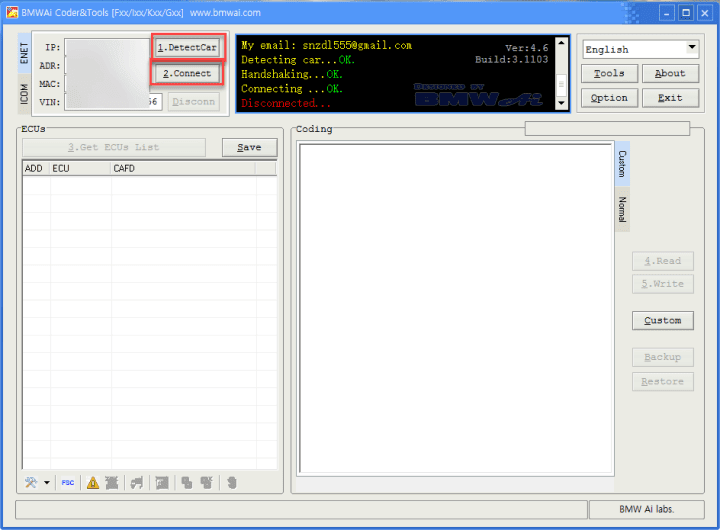
detect-car
3.Get ECUs List Press to bring up the entire module list.
get-ecus-list
Select one of the modules you want to code from the ECU list.
select-one-modules
4.Read Button to call up a list of coding coordinates that can be made in the module [1]. After changing the value of the desired item, press the [2] 5.Write button to raise the modified value to the vehicle [3].
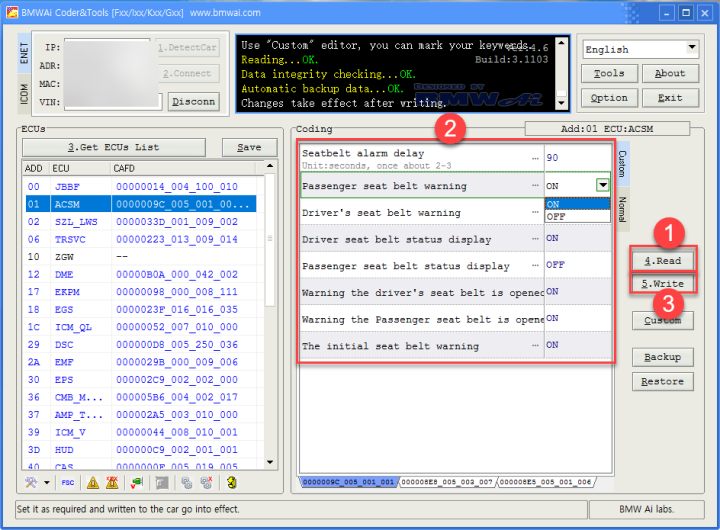
press-write-button
If you want to cancel the modification and return to the original value, Restoreclick the button.
If you want to see the coding coding for each module, please refer to the document below.


summary

You can use the BMWAiCoder to obtain the FSC code required to update the BMW car navigation map. The easiest way to obtain a map update FSC is because the program is easier to install than the existing E-Sys or Dr.Gini approach and the steps are shorter.

How to proceed

If you have not installed BMWAiCoder, please read Part I above first and proceed with installation.
After installation, connect the vehicle and cable, then turn on the vehicle.

1.DetectCar 2.ConnectPress and press to connect to the vehicle.
detect-car
3.Get ECUs List Press to bring up the entire module list.
entire-module-list

FSC Run the tool. As you can see on the screen below FSC, click the button or select from the menu FSC Tools.
run-the-fsc-tool

FSC Tools The screen will be displayed 00DE, double-click on the navigation list in the left list . Select or 00DE, then Load FSCpress.
Country Type in to mean Korea 00A6.
VerCode0028 Enter the URL for this map version .
The rest VINor NBT/CICinformation will already be entered, so there is no further change.
Generate When you click the button, FSC is created at the bottom.

There is a way to copy the FSC or fill it out and write it later when updating the map Write to car. If you enter it directly into the car, you will automatically be prompted to FSC the next time you update the map.
write-to-car

8.06.2017

BMW ICOM Rheingold Do not Identify F-series Solution

Problem:
Need help setting up BMW ICOM Rheingold, does not read F series
There is a diagnostic interface BMW ICOM A2 A + B + C, a Chinese clone.
Installed simply by installation, works fine reads scans, diagnoses, Version 3.47.10.13054
THERE IS A PROBLEM! Do not read the BMW F-series
Says it was not possible to identify the car.
What to do?
icom-f-series-1
icom-f-series-2
icom-f-series-3
Working solution:
Put in the VCI Configuration check box is not for the item “Prefer Ethernet as the preferred communication channel for ICOM.”

Test Result:
It works, thanks.


8.01.2017

BMW Dr.gini B020 Engineering Software User Manual

Dr.gini B020 BMW diagnostic software is a new program released as BMW ICOM software and tested OK to work perfect with a communication interface (BMW ICOM, BMW ICOM Next, BMW ENET cable, PASSTHRU or INPA K+DCAN cable).

Dr gini BMW download FREE: Unknown security
or

Dr gini BMW download: Tested OK
dr-gini 
How to install Dr.gini – b020:

Step 1: install EDIABAS.
Run the EDIABAS _7.3.0.msi in the EDIABAS folder to install the EDIABAS
Do not change any setting during installation.

Step 2: install Dr.Gini
Unpack the “Setup Dr.Gini B014 EN.zip” to run and install
Note: the setup is not completed

Step 3: files replacements in EDIABAS
Copy extracted files in the ECU folder to the ECU folder where EDIABAS program is installed

Step 4: Copy the EDIABAS.INI in”INTERFACES/ENET Ediabas.INI and overwrite the C:/EDIABAS/BIN folder, as Dr.Gini will be connected by the ENET cable.
Copy the api32.dll file in the “API32.DLL” folder to:
For Windows 7/8/8.1 / 10 64-bit:
C:/Windows/SysWOW64
For Windows 7/8/8.1 / 10 32-bit :
C:/Windows/System32

Step 5: Copy the Gini_B020.exe file to C:/EDIABAS/BIN.
Sometimes, Gini_B020.exe is recognized as a malicious program and may be removed from an anti-virus program. If you feel that this process is unstable, you can just delete this file.

Dr.gini – b020 installation completes.!


How to use Dr gini BMW:


Dr.Gini – Interface Configurator (ICOM, ENET, K+DCAN, PASSTHRU)
Discover & manage up to 3x ICOM interfaces
Dr.gini-b020-manual-1
Dr.gini-b020-manual-2
Dr.gini-b020-manual-3
Dr.gini-b020-manual-4
Dr.Gini – Register a Battery (E series) – Expert
Dr.gini-b020-manual-5
Dr.Gini – How fast you can read and display the engine analog values:
Petrol Engine: 21 gauges updated each 9ms approx.
Dr.gini-b020-manual-6
Diesel Engine: 22 gauges updated each 8ms approx.
Dr.gini-b020-manual-7
If your gauges are slow, it’s probably because of your communication interface

Dr.Gini – Reset Driver Side Window – Expert
Ecu: D_KBM
Job: STEUERN_FENSTERHEBER_DENORMIEREN
Argument: 11
–> Run Job
Dr.gini-b020-manual-8
Attention:
the driver’s window will open and close itself !
Ecu: D_KBM
Job: STEUERN_FENSTERHEBER_EINLERNEN
Argument: 11
–> Run Job
Dr.gini-b020-manual-9
25th December 2016… Save the date…
Dr.gini-b020-manual-10
Dr.gini-b020-manual-11
Dr.gini-b020-manual-12
Dr.gini-b020-manual-13
Dr.Gini B021 – What’s new in Basic version?
Dr.gini-b020-manual-15
  1. FSC read and write for E series
    –> enter Ecu Address, then press Status to get started
  2. Maps Code generator
    –> drag and drop FSC in the Textbox to get started
  3.  Dashboard controls
  4.  Footwell Module Reset counter
http://blog.obdii365.com/2017/08/01/dr-gini-b020-bmw-manual/

7.20.2017

BMW Coding ISTA E-sys ETK FSC BMWAicoder Download

BMW Coding Software Resources ISTA E-sys, ETK,FSC generation, ISTA Voltage Control tool RHEINGOLD ISTA+ standalone  etc programs free download links.


Information

Links for downloading BMW ICOM coding related software. Most of the material below is on Mega. If you are having trouble downloading the material from Mega. 

Credit to Jihunx from Korean who collected the download resources.


E-SYS / E-SYS LAUNCHER PREMIUM / PSDZDATA LITE / ESYSPLUS

  • E-Sys: v3.28.1
  • E-Sys Launcher Premium: v2.7.1 Build 135
  • Psdzdata lite: v3.62.1
  • Esysplus: v2.8
  • Download

RHEINGOLD ISTA + STANDALONE and language pack

  • ISTA +: v4.06.22
  • SQLiteDBs: v4.05.23
  • SQLiteDBs Korean: v3.54.12
  • Download

ISTA Voltage Control tool


FSC generation program


ISTA + Official User Manual


BMW ETK

  • ETK: v2017 July
  • Price: June 2010
  • Download

E-SYS LAUNCHER PREMIUM Date Change Crack


IVINI CARLY FOR BMW PRO and paid cracks


ISTA + STANDALONE / SDP / ISTA-P

  • ISTA + Standalone: ​​v4.05.31
  • SDP: v4.05.22
  • ISTA-P: v3.61.4.002
  • SQLiteDBs: v4.05.30
  • Download

ISTA-P LOADER


NcdCafdTool


Dr.Gini


BMWAicoder


ZGW_SEARCH


Mike's Easy BMW Tool

  • Inpa 5.0.6 (including English scripts and support files for F series)
  • WinKFP 5.3.1
  • EDIABAS 7.3.0
  • Integrated SP-DATEN v53.3
  • NCS Expert (Menu and Button + NCS Dummy Profile)
  • BMW Coding Tool v2.5.0 (NCS Dummy replacement & update DATEN)
  • NCS Dummy 4.0.1
  • Cable USB Driver
  • Tool32 4.0.3
  • Download

7.18.2017

V2017.7 BMW ICOM ISTA-D 4.05.32 ISTA-P 3.61.5 Software Display

The latest BMW diagnostic & programming software goes to V2017.7 BMW ICOM ISTA-D 4.05.32 ISTA-P 3.61.5. Check software list and image display here:

BMW ICOM Latest software version: V2017.07
Multi-language available in diagnosing, programming and TIS diagram circuit
Support Engineer programming
Support Windows 7


Compatible with BMW ICOM, BMW ICOM A2, ICOM A3, BMW ICOM Next

Software version:

ISTA-D 4.05.32
ISTA-P 3.61.5
VIN: 2017.04.25
Not connected 9000 days remaining

Software including:
BMW ETK: 2017.06
BMW KSD: 06.2017 Multi-language
BMW FSC Navigation Code Generator
BMWAiCoder for BMW Coding
With free BMW Engineer Software (INPA, NCS Expert, WinKFP, E-Sys 3.27.1, Psdzdata 59.0), BMW FSC code generator and BMW AiCoder

Multi-language available in diagnosing, programming and TIS diagram circuit: American English, British English, German, Spanish, French, Italian, polish, Portuguese, Turkish, Czech, Swedish, Dutch, Indian, Greek, Russian, Simplified Chinese, Traditional Chinese, Japanese, Korean and Thai.

System Requirements:

Dual-core processor, better above I3; over 4G of memory

Support Model:

It is recommended to use Lenovo ThinkPad: T61, T400, T410, T420, T430, X61, X200, X201, X220 X230 and other laptop with Intel chipset, such as I3 I5 / I7 series.