Showing posts with label BMW Explorer. Show all posts

1.17.2019

V2018.12 BMW E/F scanner Software Free Download

The latest and most stable software version of BMW E/F Scanner goes to V2018.12.  Here obdii365.com provides software download for free.

File including
v2018-12-bmw-e-f-scanner-download-1

v2018-12-bmw-e-f-scanner-download-2

v2018-12-bmw-e-f-scanner-download-3

Software version: BMW-Explorer V 18.12.03
Added new versions of  SWFL for FEM/BDC and DME/DDE
Fixed programming FEM/BDC/EGS/DME/DDE
Operating system: Windows 7 – Windows 10
Language: Russian /English
Function: Full version supports BMW Diagnosis + IMMO key programming + Mileage Correction + Coding
Full Version Feature:
1.Basic features module
3. E-series Coding module
3.E-series CAS1, CAS2, CAS3, CAS3+  mileage Reset
4.E-series keyprog module
5.FEM/BDC mileage module
6.F-series mileage correction module
7. FLASH calibration READ/WRITE calibrations for F and G series models
8. ISN reset for F-series HP8 gearbox
9. FEM/BDC keyprog module
10. ISN MSx8x (SIEMENS) for BMW
11. F-Coding module
12. Tricore module for BMW
13. CAS4 CAS4+ F-series keyprog module with F-ISN
v2018-12-bmw-e-f-scanner-software-1

v2018-12-bmw-e-f-scanner-software-2

Select the computer, and then right-click, select Manger
Open  Device Manager
Quickly we click two times on USB Serial Port
v2018-12-bmw-e-f-scanner-driver-1
We choose the bookmark Driver and we press on Update Driver
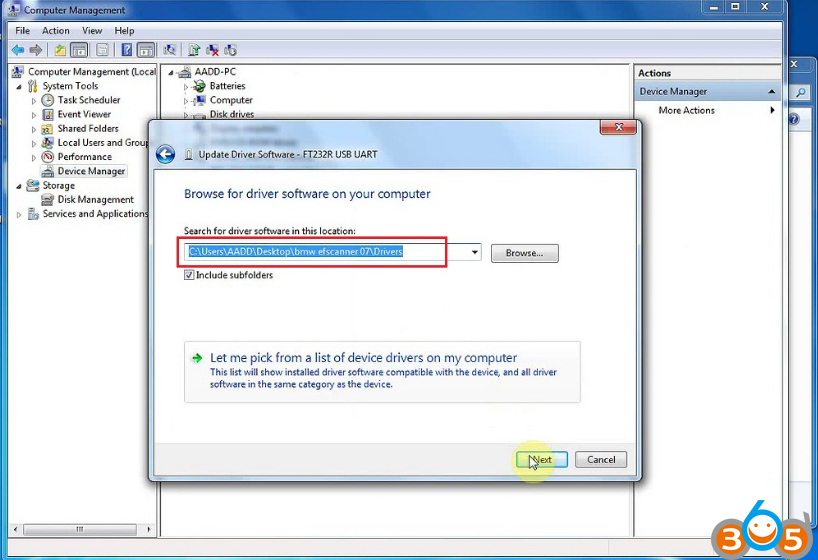
Further we choose Browse my computer for driver software and we press the Browse button
v2018-12-bmw-e-f-scanner-driver-2
Further we Choose a directory where there are drivers for the adapter (by default C:\Program Files (x86)\BMW_Explorer\Drivers\FTD2XX)
v2018-12-bmw-e-f-scanner-driver-3

v2018-12-bmw-e-f-scanner-driver-4
After the choice of drivers we press Next
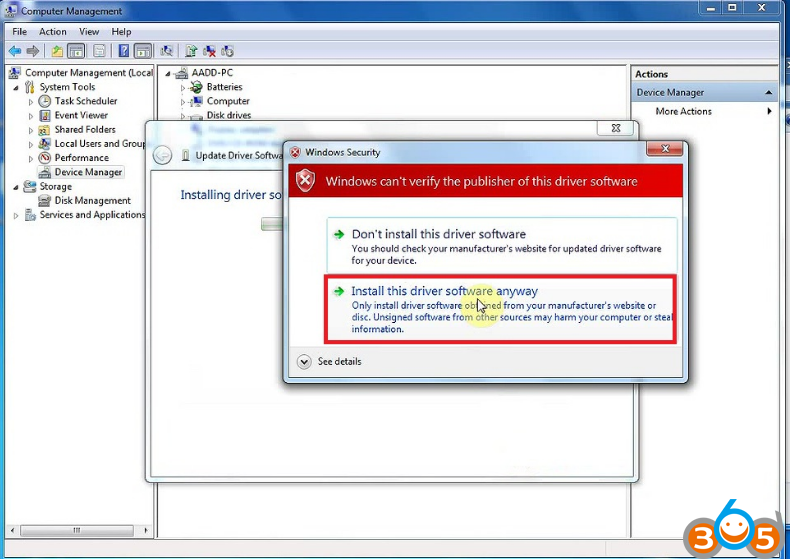
v2018-12-bmw-e-f-scanner-driver-5
We wait for the end of installation of the driver and we press Close
v2018-12-bmw-e-f-scanner-driver-6
After successful installation we will see the Adapter (USB Serial Port COMXX) in Device Manager
Done.

1.15.2019

BMW E/F Scanner Program CAS3+ All Keys Lost

Here’s the guide to write keys in CAS3+ in case of loss all working keys using BMW E/F scanner and BMW Explorer software.
bmw-e-f-scanner
ALL keys lost programming procedure
Since ver. 15.02.15 of BMW Explorer user can choose between 3 variants to program ignition key. The lastest version of BMW E/F scanner goes to V2018.12.
(Click to enlarge all images)
1. Variant
NOTE: Please ensure that key slot is unblocked before to program the new key there. 

If you have all keys lost, you must answer NO when BMW-Explorer ask if you have working key. BMW-Explorer will then extract crypto from DDE/DME and EGS GS19D (if available). Your PC must be connected to Internet to fulfill this procedure.
Also it will read ISN from the CAS module and automatically fill the CRYPTO fields in the working window of BMW Explorer.

If all the fields are match each other it means that crypto is correct and you can use any field. For example we can choose EGS crypto, then upload *.bek file, press write (red button) and just follow on-screen instructions. Then start a car.

If your car has DME/DDE with ews3 system and you are going to use EGS crypto, you must answer YES after BMW-Explorer asks you about “CFG”. Then simply wait the finish of the programming procedure. Don’t forget to make DME-CAS sync in DME menu (this step is not available for DME/CAS with ews4 )
In case if you see a different values in the DME crypto and EGS crypto fields, you can try to program the key using each field in turn. 

After the key successfully programmed you must check a key status field
002B00- for pcf7936 chip
004B00- for smart key
005B00- for keyless-go key

Note: When you are using this way of key programming, make sure than DME/DDE-CAS-EGS belongs to the SAME car
bmw-e-f-scanner-cas3-all-keys-lost-1

2 Variant

Please ensure that key slot is unblocked before to program the new key there. 

This variant is usable for a cars equipped with Bosch and Siemens DME/DDE with ews4 16 bytes long ISN code AND you have a possibility to read out ISN from DME/DDE.
BMW-Explorer can read ISN (SecretKey) from the following DME/DDE types-ME17N45 , MEV17_2 , MED17_2 , MV1722 , MVD1722 , MEV17N46 , MEVD176k , D7xN47xx , D7xN57xx , MSS60
If you got above listed DME/DDE, but BMW-Explorer was unable program key automatically, you must go to DME/DDE (Extra functions), read ISN manually and copy it. After that you must return to the CAS, select Key learning, answer NO when BMW-Explorer ask if you have working key, tick DME ISN box and Paste copied ISN into this field, then upload *.bek file, press write (red button) and just follow on-screen instructions. Then start a car.

After the key successfully programmed you must check a key status field
002B00- for pcf7936 chip
004B00- for smart key
005B00- for keyless-go key
bmw-e-f-scanner-cas3-all-keys-lost-2

3 Variant
Please ensure that key slot is unblocked before to program the new key there. 

You can TRY to program key by the following way:

1. Read CAS eeprom using any of suitable programmer (Xprog,ETL etc.)
Note: For the CAS modules programmed with ISTA36-42 (bmw numbers 9221719 , 9226238 , 9221720 , 9227053 , 9226238 , 9217853 , 9226239 , 9217854 , 9227053 , 9226239 , 9227106 , 9217854 , 9230590 , 9227053, 9230591 , 9226238 , 9237046 , 9221720 , 9237047 , 9221719 , 9237046 , 9237047), open read eeprom in the HEX Editor and write down values from the 02 and 03 columns in the 1 and 2 rows (as pictured)
bmw-e-f-scanner-cas3-all-keys-lost-3

2. Note: For the CAS modules programmed with ISTA43-55 (bmw numbers 9253119 , 9253120 , 9257219 , 9253119 , 9257220 , 9253120 , 9262360 , 9262361 , 9267608 , 9267609 , 9273192 , 9262360 , 9273193 , 9262361 , 9278745 , 9267609 ,
9278746 , 9267608 , 9283153 , 9278746 , 9283154 , 9278745 , 9287534 , 9283153 , 9287535 , 9283154 , 9314256 , 9287534 , 9321069 , 9314256) ), open read eeprom in the HEX Editor and write down values from the 00 and 01 columns in the 1 and 2 rows (as pictured)
bmw-e-f-scanner-cas3-all-keys-lost-4

Install CAS3+ back to the car, go to CAS, Extra functions, Key learning, answer NO when BMW-Explorer ask if you have working key,
wait for key data, tick Selection CFG box, enter upper 2 bytes from HEX Editor into first field, enter the lower 2 bytes from HEX Editor into second field.
bmw-e-f-scanner-cas3-all-keys-lost-5
Then upload *.bek file, press write (red button), after some time BMW Explorer will ask you to insert a key into the key slot. Enter a key and press OK. After some time BMW-Explorer will ask you about “CFG”, press YES and wait the procedure finish. Key programming can take up to 2,5 hours, therefore BATTERY CHARGER MUST BE CONNECTED TO THE CAR!!!
Note: When you are using this way of key programming, make sure than DME/DDE-CAS-EGS belongs to the SAME car

After the key successfully programmed you must check a key status field
002B00- for pcf7936 chip
004B00- for smart key
005B00- for keyless-go key
Completed.
http://www.key-programmer.org/2019/01/16/program-bmw-cas3-all-keys-lost-with-bmw-e-f-scanner/

11.06.2017

E-sys DME Coding For BMW F30 After Replacement

I wirte up this topix about how to coding DME for BMW F30 335xi after engine repalcement.
To fix car I decided to replace engine. I bought a new engine with all equipment (including DME) from “Authorized BMW disassembling facility” and everything is mounted in the car. Only gearbox from old engine was mounted to the new engine. The engine is pretty new with only 7km on dash.

The old DME engine
DME-old-engine
The new DME engine:
DME-new-engine-1024x214
Both DME looks exactly the same, but numbers on them are different.
Now I want to start the car.
I connected to the car with Rheingold and received few errors from DME:
1F2108 DME, incorrect data record: Variant monitoring
1F2601 DME, encoding: Missing
1F2604 DME, encoding: Vehicle identification number wrong

Ps. 1F2108 DME, incorrect data record: Variant monitoring in details:
Fault description:
The diagnosis monitors the software variants between CAS and DME.
Fault monitoring conditions: The fault is detected whenever the software variants fail to match one another.
Action in service: Continue troubleshooting at following control unit:
-CAS.
-Reprogram and encode the DME.

With the situation above, i was confused to do anything. Then post a thread on a forum. People answered me as follows. Put questions and answers here, hope they will help someone out also.

How to align the DME to the car ?
Use abritus and ista-p.
Is the error “1F2108 DME” mean that I need to flash DME ?
You must reencode DME with E-sys and if car still not start you must move ISN data from old ecu and do sync with ISTA/D.

Should i BUY bmw explorer / ecu explorer?
you will need to buy ECU explorer not BMW explorer

I heard that when there is sync issue the engine will not try to start.
When I try to start the car the engine cranks.
Is this means that sync between DME an CAS is not the issue ?
In Esys I noticed that DME lack of CAFD. Is this could cause the engine to not starting ?
In esys click on “DME2 [12]” than click on “Detect CAF…” than choose CAF file and code DME, but you will still have to synch ISN number CAS-DME to start engine.
DME-enet-sys
Several modules with your ISN and VIN must match up internally to start the car, you may be able to get the trans into neutral and power to the ignition to crank, but if you don’t have the EKPS (electronic fuel pump module in F3X, idk the F10 equivalent) matching up with the DME and the gearbox module the fuel will never flow and then you can crank all day but never start because the fuel pump is disabled.

Is it possible to code the old DME for controlling turbo by wire ?
It sounds like you are trying to convert a PWG car to EWG. The 2 are incompatible and I have not found any instance of anyone being successful with such a swap yet. Your case is different since your changing so many components but it has not been done yet to my knowledge.

How the type (PWG and EWG) is represented in FA??
It is not compatible for original and replaced DME
1: You have to read out DME VIN from replaced engine. Use BMW explore or ECU explore to change VIN and sync DME_-CAS.
2: Check read out VINs type key. Use BMW ENET E-sys to change original FA’s type key->save it.
3: Load modified FA to caculate swfl, cafd…and flash it.
BTW you must use replaced engine wire harness and all parts.

7.29.2016

Which tool is best for BMW programming and coding


A lot of people are wondering which tool for BMW would be the best in BMW programming and coding among Original AVDI Abritus Commander, BMW Explorer and AutoHex II.

Here are some reviews/reports to these tools based on various experienced mechanics/experts.


Original AVDI Abrites
original-avdi
Review I:

I personally have AVDI original BMW FULL running the latest software and i am not very satisfied with this tool. I am looking forward to buy another tool that support more modules/control units of BMW F series, that is able to do more coding/programming and adapting of used electronic parts like ( more focused in ECU, EGS plate, CAS ISN reading).


The tool i will be getting will be used mostly in f series 2008 and up to 2014 cars for adapting and coding used ecus from other cars.

AVDI BMW SOFTWARE

DON'T WORK - Need lots of improvements:
1) AVDI sucks at flashing modules online with newest software.
2) Downgrading ecus that are flashed with ISTA p 45+ Not very good. Fails at signing at the end and f...s up the module.
3) Errors with setting up Signatures at the end of programming (don't work with old offline sw 10.5 and new software online sw v27)
4) Mileage calibration works ok in some modules but not in all of them so far i have not damaged any module during mileage calibration
5) ISN READING/WRITING of DDE/DME or CAS F Series. (doesn't work at all - Dont even bother) I have tried so far on f07, F01, F10---- (DOES NOT WORK.....wrote 100 times avdi about this issue. answer- sorry currently this feature is not supported blla blla blla) 
6) ISN READING/WRITINGin DDE/DME E series. ( I have tried to read DME CODE in a dozen of cars) --- Was able to read only one DME (PETROL). In order to read ISN, you need either to open the ECU or if you are lucky to have the set of (CAS,DDE/DME and the KEY) so you can read cas code to get the dde/dme code. 

7) ISN READING/WRITING in CAS - E series. Works ok 60-80% on CAS 2 and CAS 3, CAS 3+ if the car has not been updated via icom and has the latest software.

While programming
So far I have damaged: ZGWs, DSC, DDE/DME, Kombi (instrument cluster), FRM (light modules), climatronic and i was able to flash back and fix some of them with ICOM but some not since they lost communication over obd2. Maybe could be fixed with a programmer.


Does ok:
1) Diagnostic scan works 80% ok except (bmw x3 e83 scans ok but does not show DTCs)
2) AVDI works ok in E series coverage (50-70%) in most of ECUs coding (customization of ecu configurations like FRM, Clima, AIRBAG)
3) Vin number changing, Coding parameters, Synchronizing dde/cas/elv works ok in 75-90%
4) ISN Reading/writing in CAS E series, does 60%-80% of them (they have very behind with updates with some petrol cars (DME)
5) EGS ISN coding - does 30-40% i have done 5 of them failed 2 of them 

Customer support (never rely on them. They never help. AMS active. Don't give a damn about you. Trust me. Been 2+ years a customer of them. 


Review II:

AVDI - Mileage calibration works okay in some modules but not in all of them.

So far i have done E60, E70, E90 and i could not really succeeded without using other tools.

CAS 2 does not do it, CAS 3 did once had do reflash firmware ended up having issues then had to use BMW ICOM to reflash CAS so i could then do it with R260 on bench.

I Believe it is good only do reset DSC to zero and do TRANSFER CASE box.


autohex-ii

Review I:
Autohex II is an excellent tool for BMW and support is 100% ok, adapt used ecu coding and also read isn in egs and its much cheaper than BMW explorer.


I have BMW Explorer and Autohex II.... I have also used them very often. Honestly, I strongly recommend Autohex for the following reasons:

1. Excellent in flashing and adapting modules.

2. Reads DME, CAS and EGS ISN perfect and stable.

3. I was able to reflash a faulty DME, and coded it to the car without hassle. Saved the customer some money.

4. Has very good Customer service and technical support teams. Always willing to assist you...

5. Key programming is pretty straight forward..


Yes, Autohex II users are very happy with the tool, because it works as it promises, as well as a great support.


Review II:
Autohex is excellent in what it does and it will save you from your mistakes, or your wishfull thinking. 

I like autohex 2, use it weekly in my shop. Everything from replacing DME, CAS modules, DSC modules. I mainly use it on E60/E90 chassis cars, on older E39/E46/E38/E53 I virginize DMEs by hand, as no tool can do those. 

Programming is nice and easy with autohex. Customer support is quick and is willing to connect with teamviewer very fast to troubleshoot/help you out. I've had a problem with the first hardware I received, it failed after a month. After I shipped it back out for warranty repair, it couldn't get delivered back to dubai. They sent me another interface at their cost, and matched the serial number to mine. Now that is amazing customer service, good luck finding another company that charges thousands for interface and is willing to send a replacement at their cost. 

Their recent update enabled manual/advanced coding for almost all modules, which is nice. You have more control over coding with it, and can easily always restore to original settings with a press of a button. 

Another bonus is that it does WIFI connection or USB. Wifi is convenient to not have wires in the way/etc.

I have AutohexII and I can tell you it's not the all singing all dancing tool they say.

I had to repair my tool before it would work for a start.

Support was not in any way helpful when I needed it.

The interface itself is quite clunky to use.
For example, if you want to code keys, it has to scan every module in the car before it takes you to the coding screen, this takes quite a few mins to complete.
There is no information about the CAS like software version it's running on this screen, it does have key code though.
If you want to synch the CAS/DME at the end of the operation, you have to exit this screen and navigate you way through another entire branch of menu's to do this.
Every time you exit and enter a menu branch, it has to re-scan all the modules in the car, this takes a long time and is quite painful.

It's as safe as any other tool doing downgrades on CAS, ie click and hope.
I bought this tool specifically for key coding so that I wouldn't have to downgrade the CAS.
It is supposed to be able to read ISN from a lot of different DME's.
In my experience, it is hit and miss on this.
Support will tell you that it can take an hour to read an ISN from certain ECU's but they won't tell you which ones they are.
During the reading process on a lot of DME's, odd clicking noises come from the engine bay of the car, the software flashes warnings up for a split second and then removes them, the list goes on.

Software upgrades are not announced to the customers, I just randomly update mine every month or so.

Do I use it, yes but I only use it for simple key coding jobs which could be completed with a Chinese Multitool just as easily.
I don't have enough faith in this tool (or any other) to downgrade a CAS.

Telling customers that your support is great does not count, only customers can tell you your support is great.

Finally, this tool has caused me more headaches than it has solved, maybe one day it will impress me but today is not that day.


Review III:
Autohex is the first tool I grab. All tools have their specifics but for the money Autohex is #1 in my opinion.

I think you sore about something with this tool. Give it a second try. The newest update read / write ISN and other stuff on the table.

I'm trying now as we speak. Works 100%.
i have this tool also as i have all other tools.
i have been working in the isn extraction for 17 years i use to do them manually the read and transfer also the checksum calculation use to give me a big head ace , i had to buy tools used for remapping so i can read the engine ecu by debugger and by bdm and read and write on the table .


BMW Explorer:
bmw-explorer


Hi, as many coders are already aware, the F series BMWs have time locks built into the DME, prohibiting reading and writing of certain parameters such as ISN (secret key), VMax (electronically limited top speed) and KAT (delete the painfully annoying CEL and fault due to sport or catless downpipes). ECU Explorer is a tool designed specifically to read and write the internal eeprom of the DMEs used in many current BMW models. The eeprom is where the hour counter is located, using this tool should allow you to reset your hour counter therefore unlocking time locked parameters such as VMax. 
So far I have successfully removed my DME from my car (with some awesome help from mechanic, opened the case, shorted the required pin and connected to my computer, unfortunately by the time I got there I ran into software problems and decided to hold off until I had more time. 
Since, I have gotten my car back together and running perfectly with no faults, and also figured out the next step in the software. The hard part is out of the way, I've successfully done the required physical hacking of the board, all that's left is for me to find time to remove my DME again and finish the process with ECU Explorer. 


To sum up:
There is no such thing as a best or perfect tool.
Expert who had all these tools says:

1. autohex (re-prog very fast + safe,coding too..this tool not make re-calc,going future)
2. avdi (re-prog %50 sometime give defective to ecus,in next days will be better)
3. explorer (good tool but not support re-prog)


with autohex2 all is history . all is done by obd . also for programming .
avdi is 70% reliable for isn and 0% for programming . i had to make emergency flashing many times due to programming with avdi.
bmw explorer is same as autohex2 but lacks the programming function .
only disadvantage for autohex2 is when your subscription is over you cannot make isan calculation.
bmw explorer is done offline for isn.